GTM Automation for Investment Firms: The 2026 Playbook PE, VC & Hedge Funds Are Actually Using
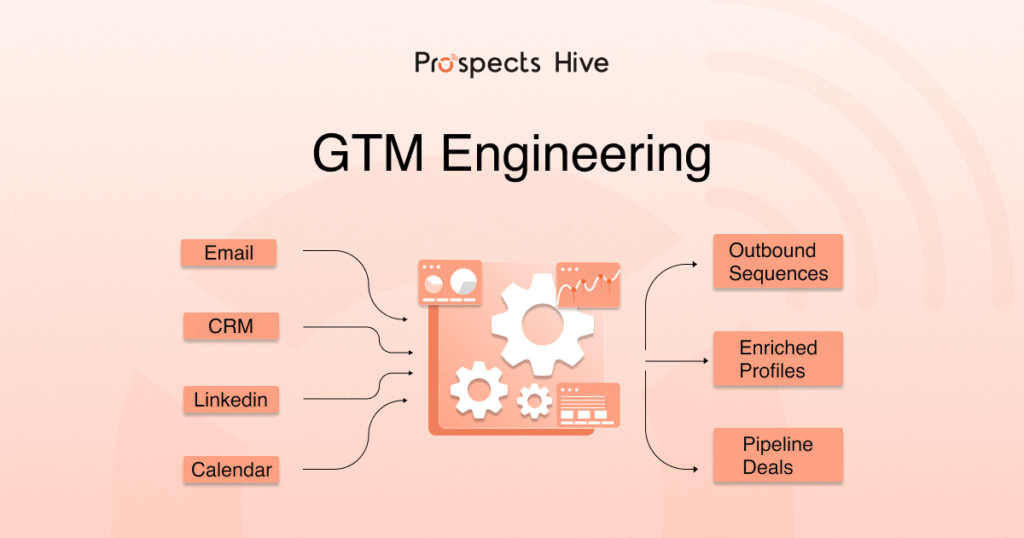
The average deal cycle for an investment firm runs about 14 months without automation. That is a long time to rely on spreadsheets, manual follow-ups, and gut instinct. Here is the reality: your competitors are not just working harder. They are building systems that work while their analysts sleep. GTM automation for investment firms is not a buzzword. It is a real operating shift happening across private equity, venture capital, and hedge funds right now. Firms that get this right close deals faster, engage LPs more consistently, and build the kind of revenue infrastructure that buyers reward at exit. This guide breaks down how it works, what tools are actually worth using, and where to start if you are building from scratch. Quick Wins box Automated nurture reduces deal cycles by roughly 30%. AI-scored ICP lists generate 3 to 5 times more qualified leads than manual database searches. The modern GTM stack runs on 4 layers: Data, Research, Engagement, and CRM. Investment GTM is not like SaaS GTM. Relationship cycles are longer, compliance is real, and timing matters more than volume. The right starting sequence: CRM setup first, then ICP scoring, then signal monitoring, then outbound sequences. What is GTM Automation for Investment Firms, and Why Does It Feel Different? GTM automation for investment firms means using software, AI workflows, and data systems to handle the repeatable parts of deal sourcing, investor outreach, fundraising, and relationship management. But here is what most general guides miss: investment GTM is a different animal. A SaaS company can blast 10,000 cold emails and convert 2%. That math works there. It does not work when you are trying to get a founder to take your call or an LP to wire $50 million. PE, VC, and Hedge Funds Each Have Different GTM Needs Firm Type Primary GTM Goal Key Relationship Private Equity Deal origination, add-on sourcing Founders, M&A advisors, intermediaries Venture Capital Early-stage deal flow, founder access Founders, co-investors, scouts Hedge Funds LP capital, prime broker relationships Institutional LPs, family offices, allocators Each of these firms needs a different automation approach. The signals that matter are different. The compliance constraints are different. And the relationship depth required before any transaction closes is much higher. 💡Signal Based Selling: How Modern GTM Teams Build Pipeline Without Guesswork The 12 to 18 Month Reality is, most B2B SaaS deals close in weeks. Investment transactions close in quarters or years. That changes everything about how you automate. Your automation cannot just focus on conversion. It has to maintain presence, build credibility, and deliver value consistently over a very long runway. Compliance is also real here. Financial services firms operate under SEC, FINRA, and other regulatory frameworks. Any outreach automation has to account for supervised communications, recordkeeping requirements, and consent management. Ignoring this is not a shortcut. It is a liability. The 4-Layer GTM Automation Stack That Modern Investment Firms Are Building Right Now Think of your GTM automation infrastructure as 4 layers stacked on top of each other. Each one feeds the next. Layer 1: The Data Layer (Waterfall Enrichment) This is your foundation. Without clean, complete data, every automation downstream produces garbage. Modern firms use “waterfall” enrichment logic. If ZoomInfo does not have a founder’s mobile number or a company’s latest funding round, the system automatically queries 50 or more additional sources until it finds a match. Tools like Clay and Databar do this natively. No single provider has everything. The waterfall approach ensures you do not stop at the first dead end. Layer 2: The Research Layer (AI Agents) Instead of analysts spending hours browsing LinkedIn and reading news alerts, AI agents now do continuous research. These agents scan recent news articles, GitHub commit activity, patent filings, and job postings. They score companies against your specific investment thesis. They run 24 hours a day without taking a lunch break. Tools like Perplexity API or Claude Code can be connected to your research pipeline to surface relevant targets in real time. Layer 3: The Engagement Layer (Signal-Based Outreach) This is where most firms get it wrong. They still send outreach based on cold lists. The better approach: trigger outreach based on live signals. A key executive hire. A competitor losing market share. A mid-market firm switching from a legacy ERP to a cloud system. These signals tell you that a company is at an inflection point. Platforms like Smartlead and Sendr enable signal-triggered sequences. You define the event. The system fires the outreach within 24 hours. Layer 4: The CRM Layer (Intelligence Hub) Your CRM is no longer just a database. In 2026, it is an AI-native intelligence hub. Attio and HubSpot now automatically record meeting insights and update deal stages without manual entry. You come out of a call. The system logs it, extracts the key points, and moves the deal to the next stage. That means your pipeline data is actually accurate. Which means your reporting is actually useful. 💡 10+ Best CRM for Outbound Sales in 2026: The Ultimate Decision Framework The Core Use Cases for GTM Automation in Investment Firms This is the most practical section. Here is where automation actually creates leverage. Deal Sourcing and Origination Automation Manual database searches are a 2022 workflow. Here is what replaces them: Predictive company scoring: AI matches companies against your thesis criteria automatically. AUM range, sector, geography, growth signals, team background. Intent signal tracking: Monitor SEC filings, Crunchbase funding events, LinkedIn job postings, and web traffic changes for trigger events. Founder and company monitoring: Set persistent watches on target companies. Get alerted when something changes. Enrichment workflows: Pull contact data, firmographics, and technographics automatically as new targets are identified. Automated prioritization: Score and rank targets so your partners spend time on the highest-fit opportunities first. The result: your team stops hunting and starts responding to a ranked queue of warm targets. Investor Relations and LP Outreach Automation Fundraising communication is one of the highest-leverage areas to automate because it is also one of the