Author name: Zikra Tayab

Meet Zikra, and Asst. Content Manager known for her analytical thinking and structured approach to complex topics. She writes to inform decisions, not chase attention.

GTM Engineering
Go-To-Market

GTM Engineering: Building the Revenue Engine Your Company Actually Needs

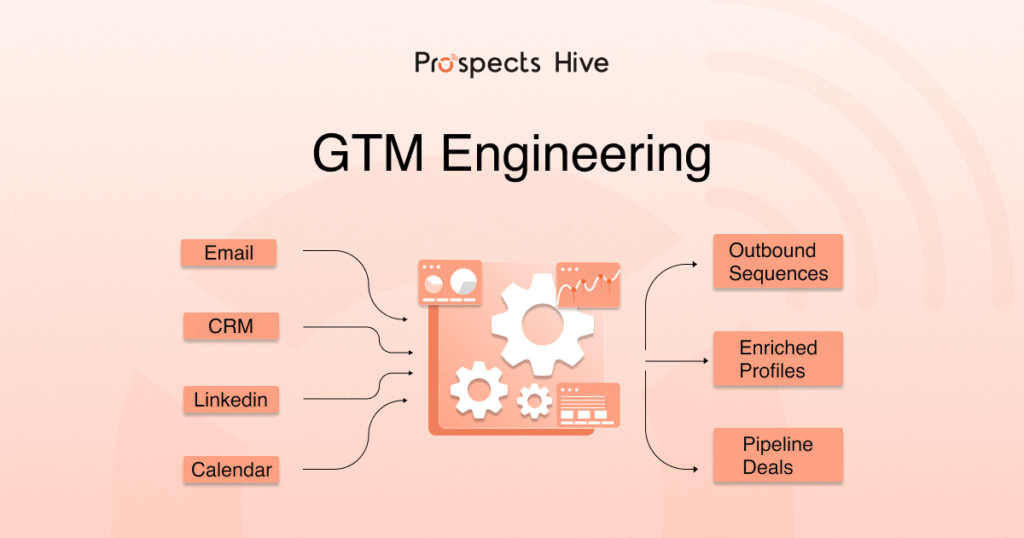
The traditional playbook for sales growth is collapsing. Your company can’t hire its way out of the problem anymore. A sales team that doubled in size used to drive doubled revenue. That math broke somewhere around 2023. Now you’re adding SDRs, paying them 40-50k per year each, and watching cold email reply rates crater to 3-5%. Meanwhile, your RevOps team is drowning in manual work just to keep your 15+ tools talking to each other. Here, GTM engineering brings the solution to the door. Not as a buzzword. As a response to what actually changed. What Changed Between 2024 and 2026 3 things happened simultaneously, and they all point to the same gap. First, buyer behavior shifted. A 2024 Gartner survey of 632 B2B buyers found that 61% prefer an overall rep-free buying experience, and 73% actively avoid suppliers who send irrelevant outreach. Your inbound channels are being squeezed not because your product doesn’t resonate, but because buyers want to self-educate before they ever talk to a human. Second, cold outreach hit saturation. The average decision-maker now receives more than 100 sales emails per week. The overall average reply rate for cold emails is 3.43%, with top performers exceeding 10%, and 58% of all replies coming from the initial email. The math is brutal: for every 100 emails you send, you might get 3-4 replies. Hiring more SDRs to solve this just multiplies the noise. Third, your tech stack became unmanageable. The average mid-market B2B SaaS company runs 15 to 30 marketing tools, with a third of them not talking to each other and another third duplicating what the others already do. B2B sales organizations now average 8.3 tools per SDR at roughly $187 per rep per month, and SDRs spend only 28% of their time actually selling; the rest is spent logging activities, switching between tools, and finding data. Your RevOps team isn’t managing processes anymore. They’re managing chaos. Into this gap stepped GTM Engineering. GTM Engineering Isn’t RevOps, Growth, or Sales Engineering It’s important to be precise here because the market is still confused. RevOps manages existing processes. They ensure forecasting is accurate, pipeline hygiene stays clean, and handoffs between marketing and sales aren’t broken. They optimize the system you have. GTM Engineers build new systems. They take a sales workflow that currently requires 4 manual steps and 3 tool integrations and turn it into an automated pipeline. They don’t optimize the broken system. They replace it. They focus on product-led growth and build in-app funnels, referral loops, and activation workflows. A GTM Engineer’s customer is the revenue team. Sales Engineers sell. They run demos, handle technical objections, and close deals. They’re quota-carrying. A GTM Engineer is a builder for sales, not a seller. The practical difference: if your cold outreach is getting 2% reply rates because you’re sending generic emails to bad lists, RevOps might restructure your process. A GTM Engineer rebuilds the entire pipeline so each email is preceded by 5 minutes of research, anchored to a real signal, and followed by a multi-channel sequence that respects the prospect’s time. What a GTM Engineer Actually Builds Let’s talk about what this looks like in practice. A GTM Engineer typically owns 4 categories of work: 1. Systems Integration This means connecting your CRM, marketing automation platform, enrichment tools, and sales engagement platform so data flows without human intervention.  💡 10+ Best CRM for Outbound Sales in 2026: The Ultimate Decision Framework Modern buyers prefer self-serve digital experiences, yet most revenue teams still operate with disconnected tools and manual handoffs that create friction at every stage. A GTM Engineer builds this: When a prospect visits your pricing page 3 times in a week, the system automatically enriches them with firmographic data, scores them, routes them to the right account executive, and triggers a sequence. No Slack message. No manual CRM update. The data moves. 2. Data and Lead Enrichment Pipelines This isn’t just pulling email addresses from a list. It’s building real-time data pipelines that feed business signals into your sales motion. A real example: A prospect’s company just closed a Series B funding round. That’s a signal.  18 hours later, your system has identified the 5 people at that company who matter most, pulled their LinkedIn profiles, scraped their recent job changes, and created a personalized research doc that sits in your CRM. A GTM Engineer builds the automation that makes this happen without a human running each query manually. 3. Workflow Automation Most teams have workflows. They’re just broken. Tasks get stuck. Emails don’t send. Manual follow-ups slip through the cracks. A GTM Engineer designs logic that actually works.  If someone opens your email twice but doesn’t reply within 48 hours, the system sends them a LinkedIn message. If they reply but don’t schedule a call within 72 hours, a calendar invite gets sent. If they say “not a fit right now,” the system tags them for re-engagement in Q3.  This sounds simple in theory. It’s complicated in practice. 4. AI and Personalization at Scale The GTM engineers commanding the highest salaries are not tool administrators. They’re systems thinkers who understand how data flows from source to CRM to sequence, and can build and debug that pipeline end-to-end. Modern AI enables researching a prospect, generating a personalized first line for their specific situation, and sending it to 500 people in a week.  A GTM Engineer builds the system that does this without sounding generic. They understand the difference between “Hello [First_Name]” and actual personalization. Why This Role Exploded in 2024-2025 The numbers tell the story. GTM engineering job postings grew 205% from 2024 to 2025, and in January 2026, LinkedIn listed over 3,000 open GTM Engineer positions. Glassdoor puts the average US salary at $182,000. (Source) This isn’t temporary hiring. Companies like OpenAI, Clay, Ramp, and Vercel are paying $250K+ for the strongest candidates. Why the premium?  Because GTM Engineers can make a 100-person company operate like a 1,000-person organization. They replace headcount with code

Cold Email

Cold Emailing Tools: Best Software for Scalable B2B Outbound

Cold outreach in 2026 is not about sending more emails. It is about sending the right emails, from the right inboxes, at the right time. Volume without control now kills deliverability. We’ve seen it happen. A few wrong settings, and your domain reputation drops. Replies slow down. Pipeline stalls. The budget disappears. Today, results come from 3 things: clean deliverability, smart automation, and AI-powered personalization. The wrong cold emailing tool makes everything harder. The right one makes scaling predictable. In this guide, we break down the best cold emailing tools, how they compare, and how to choose the right one for your situation. Quick TL;DR for Busy Founders Lemlist: Best Overall Cold Email Tool for SMBs Saleshandy: Best for Agencies Managing Multiple Inboxes Reply.io: Best for In-House Sales Teams Instantly: Best AI-Powered Cold Email Automation Tool GMass: Best Cheapest Cold Email Software Hunter: Best Free Cold Email Software Lemlist: Best Multichannel Email Outreach Tool Best Cold Emailing Tools: Quick Overview Before we jump into the detailed review of the best cold email tools, here is a quick overview to skim through. 💡 Cold Email Templates Guide for B2B Teams Tools Free Trial Starting Price Best for Rating (G2) Lemlist ✅ $79/month to custom Advanced personalization and multichannel outreach 4.6 Saleshandy ✅ $36 to $299/month Budget-friendly sales teams and agencies 4.6 Smartlead ✅ $39 to $390/month Agencies scaling high-volume outreach 4.6 Instantly ✅ $37.9/month to Custom Lead generation agencies 4.8 Woodpecker ✅ $0 to $9999/month Small teams and recruiters 4.5 Reply ✅ $99/month to Custom In-house sales teams (multichannel) 4.6 GMass ✅ $29.95 to $59.95/month Gmail-based outreach 4.8 Apollo ✅ Free plan to $149/month Sales teams needing data + outreach 4.7 ReachInbox ✅ Free plan to $299/month Small teams, solo users, sales professionals, and marketers 4.6 Mailshake ❌ $29 to $99/month Sales teams with structured outbound 4.7 Snov ✅ $39/month to Custom Prospecting + email outreach combo 4.5 Hunter ✅ Free plan to Custom SMBs wanting simple outreach 4.4 SmartReach ✅ $29 to $599/month Agencies and B2B outbound teams 4.6 Klenty ✅ $50 to $99/year SDR teams and enterprise sales 4.6 QuickMail ✅ $9 to $299/month Agencies managing multiple inboxes 4.7 5 Best Cold Emailing Tools (Ranked & Compared) After a quick eye-check of tools, let’s discuss each of these in more detail to find out the best one:  1. Lemlist Pricing Lemlist offers a 14-day free trial and a limited free plan. Paid plans start at $39–$55/month per user for email outreach. To unlock multichannel features like LinkedIn and calls, pricing moves to $79–$99/month per user. Additional email accounts typically cost $9/month per inbox. Overview Lemlist is one of the most recognized cold emailing tools built for sales teams that prioritize personalization.  It goes beyond basic email automation by combining AI-powered sequences, custom images, landing pages, and multichannel outreach into a single platform. Key Features Advanced personalization (AI variables, images, landing pages, videos) Multichannel outreach (Email, LinkedIn, Calls, WhatsApp) Built-in email warm-up (Lemwarm) and inbox rotation 450M+ B2B lead database with waterfall enrichment Native CRM integrations (HubSpot, Salesforce, Pipedrive) 💡 Cold Email vs LinkedIn: The Real Outbound Performance Breakdown Pros and Cons Pros and cons of Lemlist:  Pros Cons 🟢 Industry-leading personalization features 🔴 Interface can feel crowded 🟢 Native LinkedIn automation 🔴 Pricing increases with multiple inboxes 🟢 Built-in warm-up and enrichment 2. Saleshandy Pricing Saleshandy offers a 7-day free trial (with limited sending during the trial). Paid plans start at $25–$36/month (billed annually). Higher-tier plans range from $99 to $199/month, depending on email volume and prospect limits. Overview Saleshandy is an AI-assisted cold email outreach platform built for teams that want to scale without complicated setups. The interface is clean and simple, making it approachable even for first-time cold email users.  Campaign creation follows a simple structure: build a sequence, add prospects, connect inboxes, and launch. Key Features AI Sequence CoPilot that builds full outreach sequences with personalized subject lines and icebreakers 700M+ B2B lead database with filters by role, industry, and company size Unlimited email accounts and warm-up included on paid plans Trigger-based automated follow-ups and A/B testing (up to 26 variants) Native CRM integrations (HubSpot, Salesforce, Pipedrive, Zoho) Pros and Cons Pros Cons 🟢 Affordable entry pricing 🔴 No native LinkedIn automation 🟢 Unlimited sender accounts on paid plans 🔴 Limited lead finder & verification credits 🟢 AI-powered sequence builder saves time 3. Smartlead Pricing Free trial of 14 days available with basic paid plan starting at $39/month. Overview Smartlead is a high-volume cold email tool designed for outbound campaigns with automation, warm-up, inbox rotation, and centralized replies. It’s built for teams sending at scale across multiple inboxes without hurting deliverability.  multiple inboxes without hurting deliverability.  💡 AI GTM in Outbound Marketing: The 2026 Playbook for Scalable Growth The platform focuses on proper compliance, maintaining inbox health, and managing replies from one place. Key Features Managing and scaling cold email outreach with AI-driven automation. Automatically handling warm-up and deliverability across multiple inboxes. Supporting unlimited sender accounts for high-volume campaigns. Enabling personalization with dynamic fields at scale. Providing AI-based inbox rotation to spread sending load safely. Pros and Cons Pros Cons 🟢 AI-driven automation for scaling outreach. 🔴 Technical setup may be complex. 🟢 Auto warm-up and deliverability management. 🔴 Overwhelming for small teams. 🟢 Unlimited sender accounts for high volume. 4. Instantly Pricing Free plan available with paid growth plans starting from $30/month. Overview  Instantly is a cold email outreach software focused on scaling sending volume, warm-up, automated sequences and deliverability. It’s commonly used by teams that want to send large volumes quickly while keeping inbox reputation stable.  The setup is simple, making it popular for agencies and growth teams running multiple campaigns at once. Key Features Sending cold emails at scale while staying within safe limits. Automatically warming up new email domains. Supporting message personalization and custom variables. Enabling A/B testing for subject lines and email copy. 💡 How to Write a Cold Email That Gets Replies (2026 Guide + Examples) Pros and Cons Pros

Business, LinkedIn

20+ Best LinkedIn Automation Tools (2026): Ranked by Safety, Features & ROI

LinkedIn automation has taken off in the last few years, and honestly, it makes sense. Your inbox is crowded. Decision-makers are busy. And if you’re doing outbound, you can’t spend half your day sending connection requests one by one. The real issue is that manual outreach just doesn’t scale. You send invites, chase follow-ups, manage replies, and somehow still feel behind. A lot of effort. Unpredictable results. But automation isn’t risk-free. Push volume too hard, and your account gets restricted. Pick the wrong tool, and your reply rates drop while costs quietly rise. So instead of hype, this guide ranks the best LinkedIn automation tools by safety, performance, and real ROI, so you can grow without gambling your account. Read This Before Choosing a Tool LinkedIn automation technically violates ToS Cloud tools are generally safer than browser extensions More messages ≠ more replies Safety > features Multichannel > LinkedIn-only CRM integration is non-negotiable Automation doesn’t replace personalization Quick Comparison Table: 20+ Best LinkedIn Automation Tools at a Glance Before we jump into the real detail talk, let’s have a quick look at the comparison table. This table will help you to find out the ideal match based on your business needs.  Tool Starting Price Best For Architecture CRM Integration Multichannel Ideal Team Size Safety Level Lemlist $59/mo LinkedIn + Email outbound Cloud Native CRM + Zapier LinkedIn + Email SMB to Mid Higher HeyReach $79/mo Multi-account LinkedIn scale Cloud HubSpot, Pipedrive, Zapier LinkedIn only Agencies Higher GetSales $79/mo Basic LinkedIn sequences Cloud Zapier LinkedIn only Solo to Small Medium Expandi $99/mo Advanced LinkedIn automation Cloud Zapier + integrations LinkedIn + Email Small to Mid Higher Dripify $39/mo Cloud LinkedIn sequences Cloud HubSpot / Salesforce (Zapier) LinkedIn only Solo to SMB Higher LaGrowthMachine $60/mo Multichannel orchestration Cloud Native CRM LinkedIn + Email + Twitter SMB to Mid Higher Waalaxy $16/mo Budget multichannel Hybrid (Extension + Cloud) Native CRM LinkedIn + Email Solo to Agency Medium Reply.io $99/mo Full multichannel outbound Cloud Native CRM LinkedIn + Email + Calls SMB to Mid Higher Prosp.ai $79/mo AI-personalized LinkedIn outreach Cloud CRM sync LinkedIn only Solo to SMB Higher Salesflow $99/mo LinkedIn automation Cloud CRM sync LinkedIn only Small to Mid Higher We-Connect $69/mo Safe LinkedIn campaigns Cloud Zapier LinkedIn only Solo to Small Higher Botdog $69/mo LinkedIn outreach sequences Cloud Limited LinkedIn only Solo to Small Medium MeetAlfred $59/mo LinkedIn + Email + Twitter Cloud Zapier Multichannel Small teams Medium Bearconnect $59/mo AI + outreach hybrid Cloud Limited info LinkedIn + Content Solo to Small Unknown SalesRobot $59/mo LinkedIn + Email automation Cloud Zapier LinkedIn + Email Solo to Small Medium to Higher Aimfox $49/mo AI outbound workflows Cloud Limited info LinkedIn + Email Solo to SMB Medium LinkedFusion $65.95/mo LinkedIn automation Cloud Limited LinkedIn only Solo to Small Medium LinkedIn Helper $15/mo Budget LinkedIn-only Desktop CSV export LinkedIn only Solo Medium Gojiberry.ai $99/mo AI prospecting & engagement Cloud Limited info LinkedIn + Content Solo to Small Unknown Teamfluence $89/mo LinkedIn engagement automation Cloud Limited LinkedIn only SMB to Mid Higher PhantomBuster $69/mo Scraping + workflow automation Cloud API/Zapier Multi-platform Technical teams Medium 💡 Cold Email vs LinkedIn: The Real Outbound Performance Breakdown The Best 5 LinkedIn Automation Tools (Deep Breakdown) Among the 20+ best LinkedIn automation tools, we’ve filtered the top 5 for you. Here you will find a deep breakdown of these tools.  1. Lemlist Pricing Starts at $25/month (Email Warm-Up). LinkedIn workflows are available from $83/month (Sales Engagement plan). Best for Teams running email-first multichannel outbound with strong personalization and CRM integration. Overview Lemlist is a cloud-based multichannel outreach platform built primarily around email deliverability and personalization, later expanding into LinkedIn actions and cold calling. It’s not a LinkedIn-only automation tool.  Instead, it positions itself as a full outbound engagement system that combines email, LinkedIn, and calls in structured sequences. 💡The Future of Outbound Sales: How Automation is Changing the Game Its core strength lies in high personalization, deliverability protection, and CRM integration. If your strategy is email-first with LinkedIn as a supporting channel, Lemlist fits well. If you want deep LinkedIn-native automation, it may feel limited. Key Features Multichannel sequence builder (Email → LinkedIn → Calls) Advanced personalization (dynamic variables, images, videos, AI icebreakers) Built-in email warm-up tool (“lemwarm”) for deliverability CRM integrations (HubSpot, Salesforce, Pipedrive) + Zapier/Make Unified inbox to manage replies across channels Pros and Cons Pros Cons Strong multichannel automation (email + LinkedIn + calls) LinkedIn automation depth is limited compared to LinkedIn-only tools Excellent deliverability focus with lemwarm Pricing increases as you scale seats/accounts Powerful personalization capabilities Safety Notes Lemlist does not automate LinkedIn as aggressively as extension-based tools. Its strength is structured, multichannel drip logic rather than high-volume LinkedIn blasting. Because it focuses heavily on email warm-up and gradual sequence logic, it’s generally perceived as safer than volume-driven LinkedIn-only automation tools. However, LinkedIn activity still requires conservative limits and proper configuration to avoid account restrictions. 2. HeyReach Pricing Starts at ~$79 per sender/month. Agency plan ~$999/month. Unlimited plan ~$1,999/month. Best For Agencies and GTM teams managing multiple LinkedIn accounts at scale. Overview HeyReach is a cloud-based LinkedIn automation platform built specifically for high-volume outreach and multi-account management.  Unlike solo-focused tools, it’s designed for agencies and sales teams that need to rotate multiple LinkedIn senders, centralize conversations, and scale campaigns safely. Its strength lies in infrastructure: account rotation, workspaces, unified inbox, and CRM integrations.  If LinkedIn is your primary outbound channel and you’re running campaigns across many accounts, HeyReach provides the structure to do it efficiently. However, it’s LinkedIn-centric and not a full multichannel engagement tool. 💡 Outbound vs Inbound Sales: Which Strategy Actually Grows Your B2B Pipeline? Key Features Multi-account sender rotation to scale outreach safely Visual campaign builder with delays, branching logic, and lead tracking Unified inbox (“Unibox”) to manage replies across all accounts Agency workspaces with role-based permissions and client separation CRM integrations (HubSpot, Pipedrive, Clay) + Zapier, API, webhooks Pros and Cons Pros Cons Excellent for multi-account LinkedIn outreach LinkedIn-only

Cold Calling vs Cold Emailing
B2B Sales

Cold Calling vs Cold Emailing: Building A Smarter Outbound System in 2026

Generic outreach is getting ignored fast. This is no more a surprise. In 2026, your buyers are more informed, more selective, and far more protective of their time and interactions. Inbox filters have become smarter. Phone calls can easily be screened.  Yet one question still comes up in almost every B2B sales discussion: Is cold calling or cold emailing better? This blog isn’t here to pick sides in the cold calling vs cold emailing debate. It’s here to cut through the noise.  By the end, you’ll know what actually works today, why it works, and how modern teams combine cold calling, cold emailing, and social selling into a smarter outbound system. Key Notes  Cold email builds awareness, cold calls move things forward. Cold calling and cold emailing both work, but only when used together as part of a structured outbound system. Email introduces context without pressure, while calls are most effective when they reinforce existing interest or signals. Relevance and timing matter more than your cold calling or emailing volume. Modern outbound succeeds by using triggers and intent signals, not by sending more emails or making more dials. Email-first, call-second works for most B2B teams, making outbound more predictable. When email, calls, and social selling support each other, teams see higher response rates and more consistent results. What is Cold Calling? Cold calling means reaching out to a potential customer by phone without any prior relationship or direct interaction.  The goal here is simple: To pitch an offer, get an idea about their needs, and initiate a conversation that could result in a sale. In the B2B sales process, cold calling is often used to: Start a conversation. Qualify interest quickly. Book a meeting or next step. Cold calling demands immediate attention. Unlike email, where the buyer can respond later or not at all, a cold call forces a real-time decision where your prospect decides either to answer, decline, or hang up. What cold calling looks like in the sales process: Prospect research Dial a decision-maker Open the call with context Ask qualifying questions Try to book a meeting Cold calling is direct, fast, and pretty personal. It is also easy to do badly. While it remains a powerful lead generation tactic, it is also risky when done without relevance or context.  What does a good cold calling example look like?  A strong cold calling example starts with relevance and respect for time. Below is an example showing how cold calling is now done in 2026: Example 1: Context-based cold call “Hi Alex, this is Sam. I’m calling because I saw your team is hiring SDRs right now, and we’re helping sales leaders fix reply rates before they scale. Did I catch you at a bad time?” The best cold calling examples are generally short, specific, and focused on conversation, not persuasion. What is Cold Emailing? Cold emailing means reaching out to someone you have never interacted with before via an email.  The goal here is similar to that we’ve seen in cold calling: a clear intent of starting a business conversation. Typically, a cold email is: ⛔ Personal. ⛔ Relevant to the recipient’s role or problem. ⛔ Sent individually, even when automated. ⛔ Designed to get a reply, not clicks. Note: A cold email is not the same as cold email marketing or newsletters. Cold emailing for sales is all about conversations, not campaigns. In 2026, a cold email must contain one clear reason for reaching out. A good cold email should make one promise and ask one thing. It should be personalized beyond the first name. The simplest way to do so is by referring to a role, trigger, or specific problem in your email copy. Some good cold email examples that work in 2026: Good cold emails are short, contextual, and built for how people actually read email now. They contain no hype, no fluff; only a clear next step like the ones given below:  Example 1: Trigger-Based (Funding / Growth Signal) Subject: {{Company}} growth question Hi {{FirstName}}, Saw {{Company}} is hiring for {{role/team}} right now. Quick question, when teams grow fast, outbound usually becomes harder to personalize without adding headcount. Curious if that’s something you’re feeling yet. If it’s relevant, happy to share how similar teams are handling this without hiring more reps. Worth a quick chat? – Kamrul Example 2: Pain-First (Operational Friction) Subject: quick outbound question Hi {{FirstName}}, Noticed {{Company}} is targeting {{market/ICP}}. Most teams we speak to at this stage struggle with one thing, messages look “personalized” but still feel generic to buyers. Is improving reply quality something you’re actively working on, or not a priority right now? Either way, appreciate the clarity. – Kamrul Example 3: Social Proof (Subtle, Not Salesy) Subject: outbound question for {{Company}} Hi {{FirstName}}, We recently helped a {{industry}} team clean up their outbound after open rates stayed high but replies dropped. Your setup at {{Company}} looks similar from the outside, so I thought I’d ask. Open to a short conversation to see if there’s overlap? – Kamrul Cold Calling vs Cold Emailing: The Differences That Actually Matter The difference between cold calling and cold emailing is not about which channel is stronger. It is about how each fits into the buyer’s workflow. Understanding these differences listed below helps teams choose the right channel for the right moment: Category Cold Calling Cold Emailing Channel Phone Email Timing Restricted to business hours Can be sent anytime using automation Approach Prospects are called individually Personalized emails sent at scale Interaction Type Synchronous. Requires direct, real-time conversation Asynchronous. Allows prospects to engage on their own schedule. Connection Real-time conversation possible No instant interaction Metrics Calls made, calls duration Opens, clicks, replies, bounces Prospect Mindset Interrupts prospects directly Viewed at reader’s convenience  Scalability & Cost It is more labor-intensive and expensive per contact. Highly scalable and cost-effective Personalization & Depth Allows for deeper, “on-the-fly” personalization based on tone and immediate verbal cues. Offers data-driven personalization at scale, using tools to tailor

Signal Based Selling
B2B Sales

Signal Based Selling: How Modern GTM Teams Build Pipeline Without Guesswork

Most B2B sales teams put in the effort, but often miss the right timing. Buyers are less likely to reach out directly now. They do their own research, compare options, and make most decisions before responding to sales messages. Cold outreach often gets ignored. Inbound leads come in too late. Even with lots of data, teams still find it hard to know the right time to connect. Signal-based selling helps solve this problem. Signal-based selling looks at what buyers do, not just what sellers want. It helps sales teams notice real buying signals and reach out at the right time with the right message. This isn’t just another sales tactic. It’s a better way to choose who to contact, when to reach out, and why timing is more important than sending lots of messages. Key Notes: Read This First Signal-based selling means reaching out based on real buyer actions, not guesses or static lead scores. It’s built for B2B sales, marketing, and RevOps teams that want better timing, not more activity. It works best within an allbound GTM motion, where signals determine when outbound becomes relevant and when inbound is prioritized. It is not a shortcut or a silver bullet. Signals don’t replace good messaging or strategy. It is not just intent data. Strong signals combine intent, engagement, timing, and fit. What is Signal-Based Selling? Signal-based selling is a go-to-market approach in which sales and marketing teams prioritize outreach based on real buyer behavior rather than assumptions or static lead scores. Instead of treating every lead the same, teams act when prospects show clear signs they are ready to buy. These signals can include repeated visits to a pricing page, multiple stakeholders engaging with content, a new funding round, or a key decision-maker changing roles. For example, if 3 people from the same B2B company visit your pricing page within a week, that’s not random traffic. It’s a buying signal. Signal-based selling helps teams focus on timing and relevance. The main goal is to contact the right account at the right time with a message that matches what the buyer is already doing. What is a “Signal” in Sales A sales signal is a real action a buyer takes that shows interest, intent, or readiness to buy. It’s based on what the buyer does, not what the seller assumes. Instead of guessing who might be interested, signals help teams respond to observable behavior that points to demand. Types of Signals That Actually Matter Not all signals mean the same thing. The strongest signal-based selling systems look at 4 core types. 1. Intent Signals These show what problem the buyer is actively trying to solve. Examples include keyword searches, competitor comparisons, or research on review sites. 2. Engagement Signals These show direct interest in your solution. Examples include pricing page visits, case study downloads, webinar attendance, or demo requests. 3. Timing Signals These explain why the buying moment exists. Examples include new executive hires, funding rounds, rapid hiring, or company expansion. 4. Fit Signals These confirm whether the account matches your ICP. Firm size, industry, role, tech stack, and geography all matter here. Signals vs False Positives Many teams make mistakes here. A single website visit does not mean buying intent. Someone may be browsing, researching casually, or even doing competitor research. On its own, it’s noise. Having more signals doesn’t always mean better results. Tracking every click or like can create false urgency and overwhelm sales teams. What matters is signal quality and pattern, not volume. Real buying intent shows up when multiple strong signals align across intent, engagement, timing, and fit. That’s when outreach becomes relevant instead of intrusive. Why Traditional Selling Breaks Without Signals Traditional selling breaks down because it focuses on activity rather than timing. Sales teams work hard, send more emails, and make more calls, but most of that effort lands when buyers aren’t ready. The problem isn’t effort. It’s timing. Volume-based outbound is blind to buyer intent. Reps follow fixed cadences and static lists, reaching out to determine whether a company is in a buying cycle. At the same time, inbound alone waits for hand-raisers and often shows up after buyers have already shortlisted vendors. The result is wasted effort. Sales reps spend only about 30% of their time actually selling, while the rest goes into chasing accounts that aren’t ready. Without signals, teams guess. With signals, they decide when to act. How Signal Based Selling Fits an Allbound GTM Model At Prospects Hive, we’ve seen signal-based selling work best when inbound and outbound operate as one motion, not two separate efforts. In an allbound GTM model, signals act as the decision layer that tells teams when to engage and how. Signals inform outbound timing. Instead of cold outreach, we use warm outbound when an account shows intent, such as a decision-maker researching competitors or a company announcing new funding. Outreach works better because the timing makes sense. Signals also shape inbound follow-up. A simple form fill is not the same as multiple pricing page visits or a demo request from several stakeholders. High-intent signals help us prioritize faster follow-ups and route the right opportunities to sales. This signal-led allbound approach helped us drive higher-quality conversations and a more predictable pipeline. When signals decide when outbound becomes relevant, sales and marketing move together as one GTM motion. How to Implement a Signal Based Selling Strategy Signal-based selling works when it’s operational, not theoretical. Here’s a clear rollout process you can follow with the allbound orchestration layer built in. 1. Start With a Clear ICP Before you track signals, define who counts as a “real” opportunity. To identify your ICP, look for: Firmographics: industry, size, region, revenue Technographics: tools they use (and tools they’re replacing) Buying roles: who usually owns the problem and the budget These options matter because a pricing-page visit from a non-ICP account is a false positive. 2. Choose 2–3 Signals That Actually Matter Pick signals that match your sales motion and

Cold Email Templates B2B
Cold Email, Email Marketing

Cold Email Templates Guide for B2B Teams

Cold outreach emails are one of the most misunderstood parts of B2B lead generation. Most teams assume success comes from finding the best cold email templates and sending them at scale. So they collect dozens of templates, plug in first names, and expect replies. But that’s not how effective outbound sales works. In reality, high-performing B2B teams treat templates as building blocks inside a system, not shortcuts. The difference between average and high-converting cold email templates B2B teams use comes down to 3 things: Relevance (why now?) Context (why you?) Clarity (what next?) This guide breaks down cold email templates B2B teams can actually use, along with how to turn them into a repeatable outbound system. Key Takeaways Templates are frameworks, not scripts. Use trigger → problem → value → CTA. Relevance drives replies. Personalize using real signals (hiring, funding, activity). Use templates by purpose. First-touch, value-first, follow-up, social proof, breakup. Keep emails short. 50–120 words, one idea, one clear CTA. Use sequences, not single emails. Multiple touchpoints increase replies. Outbound success comes from systems. Combine templates with prospecting signals, sequencing, and consistent follow-ups. What is a Cold Email Template B2B? A B2B cold email template is a pre-structured email format used to contact potential business clients who have had no prior interaction with you. It helps sales or marketing teams consistently introduce their product/service, highlight value, and encourage a response or meeting.  A cold email template in B2B is not a fixed message you copy and paste. It’s a structured format designed to support: Prospecting emails Cold outreach emails Outbound sales campaigns B2B marketing and lead generation Think of it as a framework with variables, not a finished email. For example, instead of writing: “Hi John, we help companies grow revenue…” A proper template is built using: Trigger → “Noticed you’re hiring SDRs…” Problem → “Teams at this stage usually struggle with…” Value → “We’ve helped similar companies…” CTA → “Worth a quick chat?” This is why the most effective cold email templates B2B teams use are: Short and structured. Easy to personalize. Built around real signals. Designed for replies, not impressions. Also read: The Ultimate Guide to Cold Emailing for Beginners 5 Cold Email Templates for B2B Sales Teams Below are 5 proven cold email templates examples used in real outbound sales and prospecting systems. Each template serves a specific role in your outreach. 1. First-Touch Prospecting Cold Email Template (B2B) When to use This is your initial cold outreach email. Use it when reaching out based on a clear trigger like hiring, funding, expansion, or product launches. Why it works Most first-touch emails fail because they are generic. This template works because it starts with context and quickly ties it to a relevant problem. How it works Opens with a real-world trigger Connects to a common pain point Offers a clear, simple next step Template Example 1 Hi [First Name], I was analyzing how [Competitor] is landing 3x more leads through [specific channel or tactic], and I found a few key areas in [Company]’s current approach that could be holding you back from getting similar results. By adjusting [specific process/strategy], we can align your efforts with what’s already working for industry leaders, driving higher conversions and more qualified leads. I recorded a short video of my audit with some insights for you, can I send it over? Best, [signature] Template Example 2 Hi [First Name], [Company] is missing some key opportunities in [specific area] that [Competitor] is successfully leveraging.  We helped [CompanyName] achieve [specific benefit] with [Platform Name]. I recorded a quick video audit with some actionable insights. Let me know if you’d like to take a look! Best, [Signature] Template Example 3 Hey [First Name], Since it’s already [quarter/month], I’m guessing [Company] is focused on [specific Pain point] A lot of companies are trying to streamline their [process], but progress still feels inconsistent. That makes it harder to hit those big targets. We’re helping organizations like [Company] get [specific benefit] which has already helped [example company] achieve [result]. Could you point me to the right person at [Company] to explore if this could help you too? Cheers, [Signature] Key Personalization ideas: Hiring roles (Sales, Marketing, RevOps) Funding announcements LinkedIn activity Website changes 2. Value-First Cold Outreach Email Template When to use Use this template when you want to stand out by offering insight instead of pitching. Ideal for B2B SaaS and consultative selling. Why it works It shifts the email from “selling” to “helping,” which reduces resistance. How it works Leads with a real observation Provides immediate value Soft CTA instead of hard pitch Template Example 4 Hi [First Name], Companies across [Industry] are struggling with rising energy costs, which is impacting their bottom line more than you might realize. [Case Study Company] is saving up to [specific percentage] on energy costs without sacrificing efficiency. A quick assessment could reveal where savings are being missed at [Company Name]. Can I share more on this? Best, [Signature] P.S This can save [Company Name] [Specific percentage] of operational cost this quarter. Template Example 5 Hi [First Name], After reviewing trends in [Company]’s [specific process], it’s clear that a few simple adjustments could save significant costs and time. [Case study company] has cut [specific cost] by 25% through simple process improvements. A quick guide detailing these strategies could be a game changer for [Company]. Would it be helpful if I send over a video of how they did it? Best regards, [Signature] Template Example 6 Hi [First Name], [Company]’s [public metric/challenge, e.g., high churn rate] stands out in recent [industry report]. Our clients see 30% reductions via [specific feature]. No pitch – just sharing this benchmark report: [Link]. Worth discussing for [Company]? Best, [Your Name] Why this is a high converting cold email template No pressure Immediate value Feels personalized and thoughtful These 3 reasons usually make value-first email templates preferable for cold outreach as it tends to have a high response rate. 3. Follow-Up Cold Email Template

what is a good email conversion rate
Email Conversion Rate

What is a Good Email Conversion Rate?

Ever paused at your dashboard, wondering what is a good email conversion rate? You’re not alone. It’s one of the most searched and misunderstood email metrics. Benchmarks float around without context: one Reddit reply says 2% is great; another says you should aim higher. No one explains why. This guide is here to cut through that noise. We’ll break down what conversion rate actually means, what “good” looks like in real business scenarios, and why chasing surface-level numbers often leads teams in the wrong direction. Most importantly, we’ll focus on improving outcomes without obsessing over vanity metrics. Key Notes  There’s no single “good” email conversion rate. Context matters more than averages. Conversion rates vary by email type: cold, warm, and lifecycle emails behave very differently. Cold emails usually convert in low single digits. Warm email campaigns often reach mid single digits. Lifecycle emails can convert at higher rates, depending on timing and relevance. Audience intent and business model shape what’s realistic. Conversion rate is not the same as open rate or reply rate. Benchmarks without context are misleading and often misused. What is Email Conversion Rate? In email marketing, conversion rate measures how many recipients take the intended action after receiving an email. A conversion is not the email itself. It’s what happens after the email does its job. In simple terms: Conversion = the desired action after an email is received. That action depends on the email’s goal. Common examples include: Booking a demo Submitting a form Completing a purchase Signing up for a trial or newsletter Many teams optimize opens or clicks and assume progress. But reporting on the wrong metric leads to the wrong decisions. Conversion rate keeps performance tied to outcomes rather than activity. 💡The Ultimate Guide to Email Conversion Rate What is a Good Email Conversion Rate? A good email conversion rate depends on who you’re emailing, why you’re emailing, and what you’re asking them to do. There isn’t a single number that works across every business or campaign. Context matters more than averages. A good email conversion rate depends on, The intent of the audience The goal of the campaign The stage of the funnel General benchmark ranges (high level) Used carefully, benchmarks can help set expectations. Most email conversion rates fall into these broad ranges: Email marketing campaigns: often land in the low single digits, depending on offer and audience Cold email campaigns: usually lower, since recipients have no prior relationship Automated lifecycle emails: tend to convert higher due to timing and relevance These are reference points, not performance targets. You might ask, why there is no single “perfect” number Conversion rates vary widely based on: Business model and pricing Deal size and sales cycle length Traffic and list quality List age and engagement history Ultimately, a conversion rate is only meaningful when measured against your unique context. What’s strong for one business could be weak for another. Email Marketing Conversion rate Formula and Calculation Email conversion rate tells you how often your emails lead to a meaningful action. To avoid confusion, it’s important to calculate it correctly. The email conversion rate calculation formula is simple: Email Conversion Rate = (Number of Conversions ÷ Number of Delivered Emails) × 100 Numerator (conversions): the number of people who completed the intended action Denominator (delivered emails): emails that actually reached inboxes Delivered emails matter because bounced messages were never seen. Including them inflates results and hides real performance. Some teams use different approaches, which is where confusion starts. Delivered vs sent emails: Always use delivered emails for accuracy. Click-based vs action-based conversions: Clicks show interest; conversions reflect outcomes. Both can be tracked, but they should not be labeled the same. Email marketing Conversion Rate Benchmarks by Industry There is no single “correct” benchmark. Conversion rates vary widely by industry, email type, and audience awareness. Below are realistic email conversion rate benchmarks by industry based on current B2B and B2C performance patterns: Industry Email conversion rate Ecommerce (Overall) 1.8% – 3.34% B2B Tech / Services 1.5% – 4.6% Food & Beverage 4.9% – 7.06% Beauty & Personal Care 3.46% – 6.8% Arts & Crafts 3.89% – 5.11% Finance & Insurance 2.5% – 5.2% SaaS (Software as a Service) 2% – 7% Pet Care & Veterinary Services 2.32% – 4.17% Consumer Electronics 1.68% – 3.6% Automotive 1.33% – 4.0% Apparel & Accessories 1.35% – 3.01% Home & Furniture / Decor 1.24% – 1.9% Toys, Games & Collectibles 1.88% – 1.91% Luxury & Jewelry 0.98% – 1.46% Source: Optimonk How to Improve Email Conversion Rate Increasing your email conversion rate requires a combination of strategic steps that align with your recipients’ behavior, interests, and needs.  Here’s how you can get started: 1. Improve Relevance First Relevance is the largest lever you can pull to increase your email conversion rate. The more tailored the content, the better the chances of conversion.  Segmentation allows you to divide your audience into smaller groups based on factors such as lifecycle, interests, behavior, location, or even device usage. By doing so, you can deliver highly personalized content that resonates with each group’s needs. For example, if you’re a B2B business, sending relevant offers based on the prospect’s industry or job title can dramatically increase engagement.  Emails that include personalized recommendations have a 29% higher open rate and a 41% higher click-through rate. 2. Clear Call-to-Action (CTA)  To drive conversions, ensure your email’s CTA is clear, direct, and easy to act on. It’s crucial to focus your email on a single main CTA to avoid overwhelming the reader. Phrases like “Get the demo,” or “Download the checklist” are action-oriented and guide the recipient toward the next step. Mailchimp reports that emails with a single CTA see a 371% higher click-through rate than those with multiple competing actions. Ensure the CTA is prominently placed, especially on mobile devices where real estate is limited. 3. Reducing Post-Click Friction Often, the conversion rate breaks after the click, so it’s essential to align the email promise with

How to Write a Cold Email
Cold Email

How to Write a Cold Email That Gets Replies (2026 Guide + Examples)

Cold email is not as useless as you might think it to be at the moment. What’s ineffective is sending generic messages that request time without earning attention. In 2026, inboxes are crowded with AI-generated outreach, LinkedIn automation, and recycled templates.  The teams who are still getting replies are using a simpler but harder approach. They’re creating cold emails that establish relevant connections with their prospects while showing respect for their time. This blog shows you how to write a cold email that actually gets replies. Not just opens or vanity metrics, rather real responses. TL;DR for Busy Readers Cold emails fail because of relevance, not copy. Who you email and why now matter more than clever wording. One cold email should make one clear promise. Follow-ups are often the gamechanger rather than the first send. Cold email works best as part of a broader cold outreach strategy, not in isolation. What is a Cold Email? A cold email is a first-time outreach message sent to someone who does not know you yet. In B2B, cold email is used for: Sales conversations Business development Partnerships Networking Market discovery What a cold email is not used for: Email marketing or newsletters A sales pitch disguised as an introduction A mass message sent without context The goal of every cold email you send is simple, that is to start a conversation. Not to close a deal or to book a demo immediately. Just earn a response. 💡The Ultimate Guide to Email Conversion Rate Before You Write: The 3 Things That Decide Your Reply Rate Before thinking about subject lines or templates, get these 3 things right. They decide most of your reply rate. 1) Who You Email Even a well-written cold email fails if it’s sent to the wrong person. No matter how exceptional your copy is, that cannot fix bad targeting. Before writing anything, be clear on who should receive the email. Cold emailing works best when the email reaches someone who: Feels the impact of the problem directly. Can recognize the relevance quickly. Knows where the conversation should go next, even if they’re not the final decision-maker. This applies whether you’re writing a cold email for business, for sales, or for B2B SaaS sales. Choosing the right person is often more important than choosing the perfect words. You can determine whom to cold email by asking these simple questions before getting started with your email copy such as:  Does this person actually experience the problem I solve? Do they influence or own the decision? Is this relevant to their role today? 2) Why Now Timing is everything in cold outreach. Good “why now” signals include: Hiring for specific roles Recent funding Product launches Tech stack changes Expansion into new markets Without a reason to care now, your email becomes background noise. 3) One Clear Promise A good cold email makes one promise. Bad cold emails try to do everything at once. When an email sticks to one clear point, it’s easier to understand, respond to, and far more likely to start a conversation. Offer one clear promise like: A useful insight A relevant comparison A clearer way to think about a problem Trying to explain everything is often the fastest way to get ignored and end up straight in spam. How to Write a Cold Email That Works (With Examples) Once you’ve determined who you’re emailing, why now, and what promise you’re making, the writing becomes much easier.  Considering that you’ve already got your email list and segmentation done, here is a detailed step-by-step framework that shows you how to write a cold email that gets replies in 2026: Step 1: Research Your Prospects  Every cold email you write is for a specific person, and not a market segment. You must confirm that the person you intend to email faces the specific problem which you plan to discuss before you start writing the first line. Make sure: The account fits your ICP. The person feels the pain. There is a clear reason you chose them. Titles alone are misleading. Two people with the same role can have completely different priorities depending on company size, growth stage, and internal structure. A good cold email for B2B SaaS sales targets someone who not only has the right title, but also feels the pain today. If the prospect is wrong, no amount of personalization or copywriting will save the email. Cold email success begins with relevance, not writing skill. Step 2: Use a Credible, Human “From” Line Your “from” line decides trust before the subject line.  The “from” line is the first trust signal your prospect sees. Even before they read your subject line or message, your prospects tend to subconsciously decide whether you look like a real person or if this is just another automated outreach. Using a real name or adding your company name can help provide authenticity, context, especially in business or sales outreach, but it should never feel promotional. The goal is to look like a professional reaching out to another professional, not a brand broadcasting a message. A clean, human “from” line reduces skepticism and increases the chance your email even gets opened. For example, there are at least 5 possible forms of “from” line that you can use:  First name (Kamrul) First name + Last name (Kamrul Islam) First name + Last name, Title (Kamrul Islam, Co-Founder) First name + Company name (Kamrul at Prospects Hive) First name + Last name + Company name (Kamrul Islam at Prospects Hive) Always keep in mind that people reply to people, not brands. Step 3: Write a Subject Line That Signals Relevance Your subject line does not need to be extraordinary. It just needs to be clear. In 2026, most buyers scan subject lines and quickly decide in seconds whether something is worth opening. A good subject line signals relevance by referencing and a role-specific challenge, a recent change, or a meaningful signal related to the recipient’s business. Rules

Email Conversion Rate Benchmarks
Email Conversion Rate

Email Conversion Rate Benchmarks (2026): What Actually Drives Results

Email marketing still works. But most teams are still measuring the wrong metrics. Your open rates are inflated. Clicks could be looking nice in reports. Yet neither tells you if your email is actually driving revenue or not. That’s why knowing email conversion rate benchmarks matter. They shift the focus from activity to a specified outcome: not how many people opened your email, but how many took a meaningful action. In this blog, we’ll break down what email conversion rates really mean in 2026, what the average email conversion rate looks like across industries, and what metrics to look after in terms of email without letting them limit your growth. Read This in 60 Seconds Email conversion rate measures actions, not attention. A “good” email conversion rate depends on intent, audience, and offer. Industry benchmarks are useful, but context matters more. Cold email conversion rate benchmarks are very different from lifecycle or inbound emails. Improving conversion rate for email marketing is mostly about relevance and timing, not volume. Benchmarks guide direction. Systems drive revenue. What Is Email Conversion Rate? Email conversion rate is the percentage of recipients who complete a desired action after receiving your email. That action could be: Booking a meeting Signing up for a demo Downloading a resource Making a purchase Replying to a cold email 💡 The Ultimate Guide to Cold Emailing for Beginners In simple terms, it answers this question: How many people chose to perform a specific action (a “conversion”) after reading or clicking a link in your email? Across channels including email marketing, conversion rate measures how efficiently attention turns into outcomes.  How to Calculate Email Conversion Rate? The email conversion rate formula is simple: Email Conversion Rate = (Number of Conversions ÷ Number of Delivered Emails) × 100 Example: If 1,000 emails are delivered and 25 people convert (by performing a specific action after opening your email), your email marketing conversion rate is 2.5%. Some teams calculate conversion rate based on clicks or opens. That’s not wrong, but it changes the narrative. For revenue-focused teams, delivered emails to final action is the cleanest view. If you prefer automation, an email conversion rate calculator inside your CRM or analytics stack can track this automatically using events and goals. Email Conversion Rate Benchmarks by Industry in 2026 There is no single “correct” benchmark. Conversion rates vary widely by industry, email type, and audience awareness. Below are realistic email conversion rate benchmarks by industry based on current B2B and B2C performance patterns: Industry Email conversion rate Ecommerce (Overall) 1.8% – 3.34% B2B Tech / Services 1.5% – 4.6% Food & Beverage 4.9% – 7.06% Beauty & Personal Care 3.46% – 6.8% Arts & Crafts 3.89% – 5.11% Finance & Insurance 2.5% – 5.2% SaaS (Software as a Service) 2% – 7% Pet Care & Veterinary Services 2.32% – 4.17% Consumer Electronics 1.68% – 3.6% Automotive 1.33% – 4.0% Apparel & Accessories 1.35% – 3.01% Home & Furniture / Decor 1.24% – 1.9% Toys, Games & Collectibles 1.88% – 1.91% Luxury & Jewelry 0.98% – 1.46% Source: Optimonk What Is a Good Email Conversion Rate for Your Business? A good email conversion rate varies by industry, business type, and campaign goals, but typically ranges from 1% to 5% across most sectors. Besides the percentages, a good email conversion rate generally depends on 4 factors: Audience temperature: Cold lists convert differently than warm subscribers. Intent alignment: Educational emails convert less than bottom-of-funnel offers. Offer friction: A demo request is harder than a content download. Traffic quality: List growth strategy directly impacts conversion rate marketing performance. As a rule of thumb: For cold outbound: 1% is healthy, 2% is strong For B2B newsletters: 2%–4% For promotional B2C emails: 3%–6% How to Improve Email Conversion Rate  Increasing your email conversion rate needs a combination of strategic steps, aligned with your recipients’ behavior, interests, and needs.  Below are 5 steps to help you get started: 1. Improve Relevance First Relevance is the smartest tactic you can apply in order to increase your email conversion rate. The more tailored your content is, the better the chances of conversion.  Segmentation gives you the avenue to divide your audience into smaller groups based on factors such as lifecycle, interests, behavior, location, or even device usage. By doing so, you can deliver highly personalized content that resonates with each group’s needs. For instance, if you are a B2B company, you can boost engagement by tailoring offers to a prospect’s industry or role instead of sending the same message to everyone. Emails that include personalized recommendations have a 29% higher open rate and a 41% higher click-through rate. 2. Clear Call-to-Action (CTA)  To drive conversions, you need to make sure that your email’s CTA is clear, direct, and easy to act on. It’s important to frame your email around a single main CTA to avoid overwhelming or confusing the reader. Phrases like “Get the demo,” or “Download the checklist” are action-oriented and can potentially guide the recipient towards the next step. According to Porch Group Media, emails with a single CTA see a 371% higher click-through rate than those with multiple competing actions. 3. Reducing Post-Click Friction More than often it appears that the conversion rate breaks after the click, so it’s essential to align the email promise with the landing page.  To make it easier for the recipient to perform the desired action, your landing page should reflect the same offer and message from the email. This in turn, also minimizes distractions and maintains consistency. For example, if your email promotes a downloadable guide, the landing page should make that download option obvious and immediate, without extra steps or distractions. 4. Testing and Optimizing for Better Results To optimize email conversion rate, you must continuously improvise your emails through A/B testing. Test elements like subject lines, CTAs, and offers. Start by testing one variable at a time, so that you can understand what truly drives conversion. For instance, BigSea discovered that small subject

Email Marketing for Small Business
Business, Email Marketing

Email Marketing for Small Business: Benefits, Platforms, Services & More

According to Moosend, nearly 49% of consumers prefer receiving weekly emails from their favorite brands.  That means almost half of your potential customers are open to hearing from you directly. At the same time, 64% of consumers say they feel overwhelmed by brand communication. That gap can be addressed well if you know the proper tactics of email marketing for small businesses well.  When executed well, email is not about sending more messages. It’s about sending the right message, to the right people, at the right time. For small teams with limited budgets, that kind of focus matters. Key Takeaways  Email marketing gives small businesses huge ROI, often earning $36–$40 for every $1 spent. Personal and relevant emails keep your audience engaged and build trust over time. Automation tools make campaigns easy to manage and help small teams scale fast. A smaller, engaged email list outperforms a large, unqualified one. Avoid common mistakes: plan your strategy, track results, and don’t over-email. What Is Email Marketing for Small Business? Email marketing for small business is the practice of using email to build relationships, drive sales, and retain customers without relying heavily on paid ads or social media algorithms. Unlike enterprise email marketing, small business email marketing focuses on: Smaller, more specific audiences Limited time and resources Clear, practical communication instead of complex funnels For a small business, email marketing is less about volume and more about relevance. You are not trying to send thousands of emails a day. You are trying to stay top of mind with people who already showed interest in what you offer. This is why email marketing works so well for small teams. It allows you to compete on clarity and consistency, not budget. Benefits of Email Marketing for Small Business Still wondering if email marketing is worth it? These are the benefits that matter most for small businesses. 1. High ROI Email marketing consistently delivers one of the highest ROI (returns on investment) across digital channels. With the right email marketing strategy, even simple campaigns can generate measurable results without ongoing ad spend.  Industry benchmarks often show $36-$40 in return for every $1 spent, making it far more cost-effective than paid ads or social media marketing. 2. Audience Segmentation Email allows you to segment your audience based on behavior, interests, or past purchases. This means your email campaigns for small businesses can stay relevant instead of generic. Whether you’re targeting first-time buyers, repeat customers, or inactive subscribers, segmenting the audience helps you send the right message at the right time. 3. Builds Loyalty and Brand Trust Regular, helpful emails help customers remember your brand. Over time, this builds trust and familiarity, which is critical for repeat business. With time, this familiarity transforms into loyalty- an invaluable asset for brands despite the evolving marketing landscape. For small businesses in particular, trust is a major competitive advantage against larger brands with bigger budgets. 4. Drives Sales From product launches to limited-time offers, email marketing drives direct revenue. Many small businesses rely on email as a primary sales channel once their list is active. Many small businesses discover that once their email list is active and nurtured, email becomes their primary sales channel, especially in terms of repeating purchases and upsells. 5. Efficient and Scalable Email marketing tools for small businesses automate repetitive tasks. Once set up, campaigns continue working without daily manual effort. This makes email marketing highly scalable. Whether you have 100 subscribers or 100,000, the same system works efficiently without increasing workload or cost proportionally. How a Small Business Can Start Email Marketing (Step-by-Step) Starting email marketing does not require a big team or a complex setup. It requires clarity, consistency, and the right tools. Step 1: Choose the Right Email Marketing Platform Your results depend heavily on the platform you choose. The right platform makes it easier to design emails, manage subscribers, automate campaigns, and track performance without technical complexity. The best email marketing platforms for small business typically include: Drag-and-drop email builders Pre-designed templates Basic automation workflows Strong deliverability Clear analytics For businesses that want a hands-off approach, email marketing services like Prospects Hive handle strategy, setup, campaigns, and optimization. For DIY users, popular email newsletter platforms include Mailchimp, Brevo, and HubSpot. Step 2: Build Your Email List Organically A strong email marketing strategy starts with a high-quality, permission-based email list. Focus on permission-based growth. Avoid shortcuts. Ways to build a free email marketing list: Website sign-up forms Lead magnets like guides or checklists First-time purchase discounts Newsletter subscriptions Gather list from LinkedIn A smaller, engaged list always performs better than a large, unqualified one. Step 3: Craft Engaging Email Content Small businesses succeed when emails feel personal, relevant, and offer genuine value instead of being just overly promotional. Content is what keeps people subscribed. Use simple email marketing ideas for small business: Practical tips Short how-to guides Product education Customer stories Your emails should feel helpful, not promotional. Clean design, clear copy, and consistent branding matter more than fancy visuals. Step 4: Track Email Marketing Performance Tracking performance allows you to understand what’s working and where improvements are needed. Tracking the performance of your email campaigns helps you improve results over time, making constant optimization an integral part of your strategy. Key metrics to monitor: Open rate Click-through rate Bounce rate Unsubscribe rate Spam complaints These numbers tell you what resonates and what needs improvement. Step 5: Automate Your Email Campaigns Automation helps small businesses stay consistent without adding daily workload. Automating your email campaigns saves time and improves relevance. Common automated email campaigns for small business include: Welcome emails Educational sequences Product or service highlights CTA emails Follow-ups or reminders Automation ensures consistency without daily effort. Step 6: Segment Your Email List Not all subscribers should receive the same emails. Instead of sending one message to everyone, segmentation allows you to personalize messaging based on who your subscribers are and how they interact with your brand. Segment by: Industry or niche

Scroll to Top