Author name: Prospects Hive

Content Partnership Specialist

How Do I Develop an Email List
Email Marketing, Email Tips & Basics, LinkedIn

How Do I Develop an Email List from LinkedIn Contacts?

You’ve spent hours building your LinkedIn network, connecting with decision-makers, and nurturing relationships. But the thing is, LinkedIn’s algorithm controls who sees your updates, and many valuable connections can slip through the cracks. It’s easy to lose touch with prospects once you rely too much on the platform. That’s where the question arises: how do I develop an email list from LinkedIn contacts? The answer is simple: Take control of your connections. By owning your email list, you gain direct access to your prospects, providing a reliable channel to nurture and convert leads. Want to explore more in detail? Read on…  Key Notes LinkedIn is great for B2B connections, but owning your email list gives you control. Email lists are better than social media because you own them. Stay GDPR-compliant and use email verification to avoid bounce rates. Use tools like CRM integrations and email finders to build and verify your list. How Do I Develop an Email List from Linkedin Contacts? Highly discussed topic, how do I develop an email list from LinkedIn contacts is finally decoding. Let’s read on.  1. Optimize Your LinkedIn Profile LinkedIn profile is often the first impression potential leads have of you, so why not make it work for you? With the right optimizations, your profile can act as a lead magnet, attracting email sign-ups and encouraging meaningful connections. Headline Your headline is prime real estate. Instead of just listing your job title, make it an irresistible offer. For example, “Helping [Industry] Achieve [Desired Outcome]—Get My Free [Resource] Now!” This not only grabs attention but also clearly communicates the value you offer. About Section This is where you can dive deeper into what you do and how you can help your audience. Highlight your expertise and include a call to action (CTA) encouraging people to download your free lead magnet or sign up for your email list. Make sure the CTA stands out and clearly explains what visitors will get by signing up. Featured Section The Featured Section is often overlooked, but it’s a great place to showcase your best lead magnets, such as free guides, checklists, or webinars. Upload your content directly, or link to a landing page where visitors can opt in. Make it visually appealing, so it catches attention. Contact Info Your Contact Info section should never be empty. Include a direct link to your email sign-up landing page, so visitors can easily opt in to your list. Keep it clear and accessible for maximum conversion. 2. Email Finder for Efficient Email List Building  Building an email list from LinkedIn connections is incomplete without the right tools to verify and enrich the data. While LinkedIn gives you valuable connection details, email finders help fill in the missing pieces of professional email addresses. These tools work by searching the web for publicly available email addresses linked to a specific LinkedIn profile. Provide the best match based on historical data, ensuring that you’re not wasting time guessing or sending cold emails. Some email finder tools are Apollo, Lusha, GetProspect etc,. 3. Export/Download LinkedIn Contacts  LinkedIn makes it easy to export your connections with just a few clicks. Here’s a quick guide on how to download your LinkedIn contacts: In your LinkedIn account, navigate to Settings & Privacy, then click on Data Privacy. Select Get a copy of your data, then choose Download a larger data archive, including connections. The data will be exported as a standard CSV file. Once processed, you’ll receive a link to download the CSV file containing basic information such as names, job titles, and companies. Note: keep in mind that LinkedIn does not provide email addresses in this export file. To move beyond the basic contact details, you’ll need to use enrichment tools to fill in the gaps and get verified emails. These tools help you find professional emails for your connections and ensure the data is ready for outreach. 4. Use LinkedIn Events & Webinars to Drive Email Sign-ups  LinkedIn events and webinars offer a unique opportunity to engage your audience while capturing valuable email sign-ups. Hosting an exclusive LinkedIn-only event creates a sense of urgency and value, motivating prospects to register. Make email sign-up a requirement for registration. This ensures you’re collecting direct contact information from attendees.  Link your event registration page to a dedicated landing page, where visitors can easily enter their details to secure their spot. The key to success is aligning your webinar topic with your audience’s needs, challenges, or aspirations. 5. Create a Landing Page for Email Opt-ins Landing pages are great for converting website visitors into email subscribers. Dedicated landing pages focus on one thing: getting users to sign up and share their email addresses. Lead magnets, such as ebooks or guides, are offered on these pages to attract users. They are prompted to provide their email addresses to access the lead magnet. Here’s what needs to be done: Start by designing visually appealing, user-friendly landing pages that clearly highlight your lead magnet’s value proposition. Use persuasive copy and compelling visuals to convey the benefits of subscribing to your email list. Integrate clear and prominent call-to-action buttons that encourage visitors to take action and download your lead magnet. Optimize your landing pages for mobile devices to ensure a smooth user experience across all devices. 6. Turn Your LinkedIn Posts into Lead Magnets Every LinkedIn post you share is an opportunity to drive email sign-ups. Instead of just sharing content, turn each post into a lead magnet by linking to your lead magnet or landing page. For example, include a call-to-action at the end of your posts that encourages followers to take immediate action. Make it compelling and time-sensitive, like: “Download my free guide today and unlock proven strategies to grow your business!” 7. The Role of LinkedIn Groups in Email List Building LinkedIn groups are often an overlooked resource for building a highly-targeted email list. These groups offer a unique opportunity to connect with niche communities and engage directly with members
Email Conversion Rate

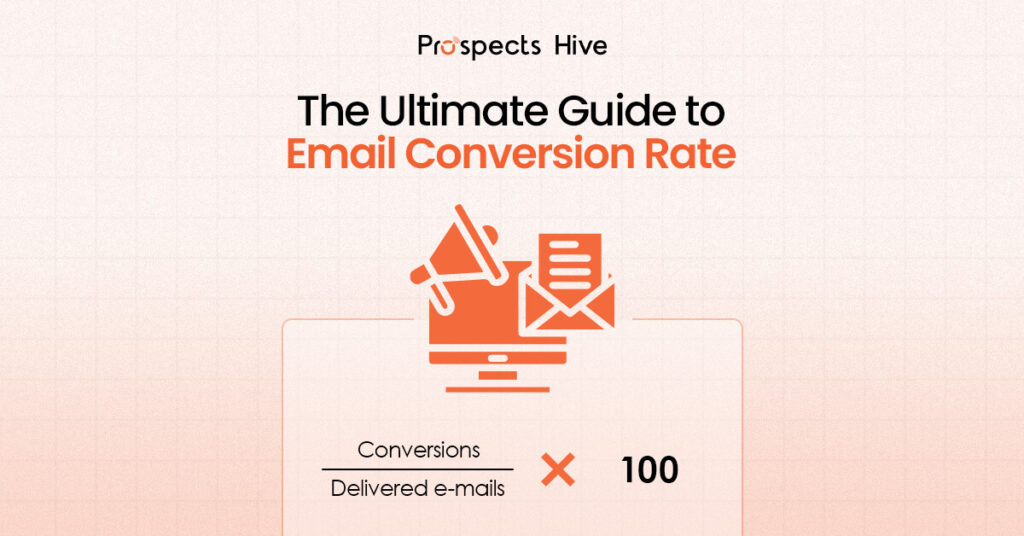
The Ultimate Guide to Email Conversion Rate

If you’re sending emails and only watching open rates and click-through rates, you’re missing the metric that actually pays the bills: email conversion rate.  This is the number that tells you whether your emails are turning attention into real actions like purchases, demo bookings, sign-ups, or downloads.  The tricky part is that “conversion” can mean different things depending on your goal, and the way you calculate it can change the story.  In this blog, we’ll define it clearly, show you the exact formula, explain what “good” looks like, and share the highest-impact ways to improve it without guessing. Key Notes: Conversion rate means measuring outcomes. Track conversions per delivered, opened, or clicked emails, depending on what you’re optimizing. “Good” varies, but most teams aim for a steady baseline and improve from there. Segmentation, a single CTA, and low post-click friction usually move the needle fastest. Deliverability and list hygiene can quietly cap your conversion rate. What is Email Conversion Rate? To start, it’s important to know the email conversion rate. It is a metric that measures the percentage of recipients who take a desired action (such as making a purchase, signing up, or downloading a resource) after opening an email. It directly correlates with how well your emails drive sales or engagement. One quick point to make it clear: Email response rate is about replies (common in cold email). Email marketing conversion rate is about the outcome you care about (meeting booked, sign-up, purchase, and so on). Formula for Email Conversion Rate: Email conversion rate = ( Conversions / Total Delivered Emails ) * 100 A higher conversion rate means your email campaigns are effectively engaging your audience and persuading them to take action. Well-segmented, personalized emails can see up to 760% higher revenue per email. The Importance of Tracking Email Conversion Rate Conversion rate is the “final step” metric. It tells you whether your email is producing real outcomes, not just activity. Campaign Monitor puts it plainly: low opens suggest timing or subject-line issues, but low conversions may mean you need to reassess the campaign more broadly. It also keeps teams honest across the funnel: If clicks are fine but conversions are low, you likely have post-click friction. If conversions drop suddenly, you may have a deliverability or list quality problem, not a copy problem. What is a Good Email Conversion Rate? A useful rule of thumb: a “good” conversion rate depends on your goal, your offer, and how you define conversion. Unbounce cites Mailchimp, saying a good email conversion rate typically falls between 2% and 5% across industries. 2 things matter more than chasing a universal benchmark: Your email type: Automated flows usually convert better than one-off campaigns because they’re triggered and more targeted. Klaviyo notes that flow conversion rates are typically higher than campaign conversion rates for this reason. Your segment quality: the more relevant the audience, the higher the conversion ceiling. If you want true “by industry” context, benchmark reports can help set expectations, but your best target is usually: beat your own baseline month over month. How to Increase Email Marketing Conversion Rate Increasing your email conversion rate requires a combination of strategic steps that align with your recipients’ behavior, interests, and needs.  Here’s how you can get started: 1. Improve Relevance First Relevance is the largest lever you can pull to increase your email conversion rate. The more tailored the content, the better the chances of conversion.  Segmentation allows you to divide your audience into smaller groups based on factors such as lifecycle, interests, behavior, location, or even device usage. By doing so, you can deliver highly personalized content that resonates with each group’s needs. For example, if you’re a B2B business, sending relevant offers based on the prospect’s industry or job title can dramatically increase engagement.  Emails that include personalized recommendations have a 29% higher open rate and a 41% higher click-through rate. 2. Clear Call-to-Action (CTA)  To drive conversions, ensure your email’s CTA is clear, direct, and easy to act on. It’s crucial to focus your email on a single main CTA to avoid overwhelming the reader. Phrases like “Get the demo,” or “Download the checklist” are action-oriented and guide the recipient toward the next step. Mailchimp reports that emails with a single CTA see a 371% higher click-through rate than those with multiple competing actions. Ensure the CTA is prominently placed, especially on mobile devices where real estate is limited. 3. Reducing Post-Click Friction Often, the conversion rate breaks after the click, so it’s essential to align the email promise with the landing page. Your landing page should reflect the same offer and message from the email, minimizing distractions and maintaining consistency. For example, if your email offers a downloadable guide, the landing page should immediately provide a clear option to download it, without unnecessary steps or confusing elements.  4. Testing and Optimizing for Better Results Continuous improvement through A/B testing is essential for email conversion optimization. Test elements like subject lines, CTAs, and offers. Start by testing one variable at a time, so you can understand what truly drives conversion. For example, BigSea found that testing subject lines in B2B cold emails can lead to a 56% higher response rate, just by tweaking how the message is framed. Testing helps you understand what works best for each segment of your audience. 5. Protecting Deliverability and List Quality To maintain a high email conversion rate, it’s essential to manage your email list and protect your deliverability. A clean list reduces the risk of bounces and complaints, improving your sender reputation.  Managing your list effectively can increase your engagement rate by up to 35%. Avoid spammy subject lines and regularly clean your list by removing inactive subscribers. This ensures that your emails reach an engaged audience, and your conversion rate remains high. Conclusion Improving your email conversion rate requires a holistic approach. Focus on segmentation, crafting a clear CTA, reducing post-click friction, and continuously testing your strategies.  Clean your email list,

Average Email Marketing Conversion Rate
Email Conversion Rate

Average Email Marketing Conversion Rate Explained (With Industry Data)

You sent the emails. You got opened. Maybe even a few clicks. But did it convert? That’s the question most email reports don’t answer. In email marketing, a conversion isn’t just a sale. It could be a booked call, a demo request, a lead form submission, or a signup. The action depends on what you asked the reader to do. That’s why average email marketing conversion rates can be misleading. A “good” number only makes sense when the conversion goal and funnel stage match. Benchmarks help, but context decides what actually matters. Key Notes  The average email marketing conversion rate usually falls between 1% and 5%. A conversion is not always a sale. It can be a sign-up, a booked call, a demo, or a form fill. “Good” conversion rates only make sense when the conversion goal and funnel stage match. Cold emails and high-ticket offers convert lower than warm, high-intent campaigns. Industry benchmarks give context, not targets. Sales cycle length and deal size strongly affect conversion rates. Many averages look inflated because clicks are counted as conversions. Improving conversion rate is often more effective than sending more emails. Small gains in relevance, CTA clarity, or follow-up can drive big ROI. What is the Average Email Conversion Rate? The short answer is: it depends. Across most industries, the average email conversion rate typically falls between 1% and 5%. That range shows up again and again in benchmark reports, case studies, and real-world campaigns. But the spread is wide for a reason. Some campaigns struggle to reach 1%, while others consistently exceed 5%. The difference usually comes down to  who you’re emailing,  what you’re asking them to do, and  where they are in the funnel. Cold outreach, high-ticket offers, and long sales cycles naturally result in lower conversion rates. Warm lists, strong intent, and low-friction actions convert higher. Many averages look inflated because clicks are counted as conversions. Others are misleading because cold and warm emails are mixed together, or landing page performance is mistaken for email performance. Why Does Email Conversion Rate Matter?  Open rates and clicks tell you if people noticed your email. The conversion rate tells you whether the email actually worked. That’s the difference between engagement and impact. Conversion rate connects email directly to revenue, leads, and ROI. It shows whether your message, offer, and follow-up experience moved someone to take a real action, not just skim a subject line. Improving conversion is often more effective than sending more emails. A small lift in conversion usually outperforms higher volume, without hurting deliverability or trust. And sometimes, a lower conversion rate is still a win. High-value offers, longer sales cycles, or top-of-funnel emails are expected to convert less, but they can create far more downstream value. Average Email Conversion Rate by Industry Email conversion rates vary widely by industry. That’s expected. Different businesses sell different things to different buyers, with very different buying journeys. Industry benchmarks exist to give context, not targets. They help you understand what’s typical for businesses with similar deal sizes, risk levels, and sales cycles. A shorter sales cycle and lower price point usually mean higher conversion rates. Longer cycles and high-ticket offers convert less often, but each conversion carries more value. That’s why a 2% conversion rate in one industry can outperform a 6% rate in another. At a high level, most industries fall into predictable ranges. But your real benchmark should still be your own historical performance, improved over time. You Might Ask Why Industry Averages Shift The answer lies in different points, such as, Sales cycle length: The longer it takes to buy, the lower the immediate conversion rate. Complex decisions need more touches. Buying risk (high-ticket vs low-ticket): Low-cost offers convert faster. High-ticket purchases require trust, proof, and time. Lead quality and list intent: Warm, high-intent lists consistently outperform cold or loosely targeted audiences. Industry Snapshots Industry Email conversion rate Ecommerce (Overall) 1.8% – 3.34% B2B Tech / Services 1.5% – 4.6% Food & Beverage 4.9% – 7.06% Beauty & Personal Care 3.46% – 6.8% Arts & Crafts 3.89% – 5.11% Finance & Insurance 2.5% – 5.2% SaaS (Software as a Service) 2% – 7% Pet Care & Veterinary Services 2.32% – 4.17% Consumer Electronics 1.68% – 3.6% Automotive 1.33% – 4.0% Apparel & Accessories 1.35% – 3.01% Home & Furniture / Decor 1.24% – 1.9% Toys, Games & Collectibles 1.88% – 1.91% Luxury & Jewelry 0.98% – 1.46% Source: Optimonk How to Improve Your Email Conversion Rate?  Increasing your email conversion rate needs a combination of strategic steps, aligned with your recipients’ behavior, interests, and needs.  Below are 5 steps to help you get started: 1. Improve Relevance First Relevance is the smartest tactic you can apply in order to increase your email conversion rate. The more tailored your content is, the better the chances of conversion.  Segmentation gives you the avenue to divide your audience into smaller groups based on factors such as lifecycle, interests, behavior, location, or even device usage. By doing so, you can deliver highly personalized content that resonates with each group’s needs. For instance, if you are a B2B company, you can boost engagement by tailoring offers to a prospect’s industry or role instead of sending the same message to everyone. Emails that include personalized recommendations have a 29% higher open rate and a 41% higher click-through rate. 2. Clear Call-to-Action (CTA)  To drive conversions, you need to make sure that your email’s CTA is clear, direct, and easy to act on. It’s important to frame your email around a single main CTA to avoid overwhelming or confusing the reader. Phrases like “Get the demo,” or “Download the checklist” are action-oriented and can potentially guide the recipient towards the next step. According to Porch Group Media, emails with a single CTA see a 371% higher click-through rate than those with multiple competing actions. 3. Reducing Post-Click Friction More than often it appears that the conversion rate breaks after the click, so it’s essential

When a Brand Decides to Use Email Marketing
Email Marketing

When a Brand Decides to Use Email Marketing

When a brand decides to use email marketing, it is not just choosing another marketing tactic. Rather, it is making a strategic decision about ownership, predictability, and long-term growth. In a landscape where algorithms change overnight, paid acquisition costs keep rising, and organic reach is increasingly unreliable, brands need a channel they can control.  Email marketing gives brands direct, permission-based access to their audience without relying on a platform. This is why the question matters. Not “should we send emails?” But “when should a brand use email marketing and what does that decision unlock?” If you ask soo, we must have to answer,  Skimmable Summary for Busy Readers   Brands decide to use email marketing when growth depends on long-term relationships, not short-term reach. Email marketing is a strategic commitment, not a one-off campaign Brands choose email to move from visibility to ownership Rising customer acquisition costs and longer sales cycles make email more valuable than ever Email works best when it supports education, trust, and relevance Long-term ROI comes from timing and intent, not email volume What Does It Really Mean When a Brand “Decides” to Use Email Marketing? When a brand decides to use email marketing, it is deciding to: Build a direct relationship with its audience Own a communication channel instead of renting attention Commit to relevance, not reach Email marketing for brands is not about sending out newsletters or launching random promotions. It is a shift in how the brand communicates. This decision signals a move away from chasing impressions toward nurturing intent. Away from short-term visibility toward long-term engagement. Away from dependency on platforms toward owned distribution. At its core, email marketing becomes a relationship-building system that supports trust, education, and conversion over time. The Real Triggers That Push Brands Towards Email Marketing While the need for a channel brands can fully own that delivers measurable ROI remains indispensable, below are the real triggers that push brands towards email marketing: Traffic is Growing, but Conversions are Not Many brands reach a point where traffic increases, but email conversion rates do not. Visitors come in, browse, and leave. Email marketing allows brands to re-engage that lost demand. It creates a second chance to educate, nurture, and convert users who were not ready the first time. Paid Channels are Becoming Less Predictable Paid ads are no longer sole stable growth engines for most brands. Algorithms change without warning Customer acquisition costs keep rising Performance fluctuates despite optimization This platform dependency is one of the main reasons why brands are fully embracing email marketing. Email offers consistency where paid channels cannot. Sales Cycles are Getting Longer For B2B brands and considered purchases, decisions take time. Email marketing works as a nurture layer. It supports education, trust-building, and repeated exposure without pressure. This is how email marketing can be especially effective for longer sales cycles. The Brand Needs Repeat Customers Retention is no longer optional. Email marketing benefits brands by supporting repeat purchases, customer education, and loyalty. It keeps the brand present long after the first transaction. When Email Marketing Makes the Most Sense Email marketing is powerful, but it is not a universal fix. It works best in specific situations, and knowing when it makes sense is just as important as knowing how to do it. When Email Marketing Is a Strong Fit Email marketing for brands works best when: There is existing or growing traffic The brand has a clear value proposition The audience needs education or nurturing Long-term relationships matter This is when email marketing strategy becomes a growth multiplier. When Email Marketing Is Not the Priority Yet Email marketing may not be the right focus if: There is no traffic or demand ICP and messaging are unclear The brand expects instant results There is no content worth subscribing to Starting email marketing too early can be just as ineffective as starting too late. Common Mistakes Brands Make When Starting Email Marketing Below are the most common mistakes which cause many email marketing campaigns to fail:  Treating email as a broadcast channel Over-emailing without segmentation Ignoring engagement and behavior signals Sending promotions without context or value to your audience How to Know If Your Brand Is Ready for Email Marketing Your brand is set to go for email marketing when growth begins to be less dependent on visibility and more on building direct relationships with an audience you can reach without algorithms or ad spend. Use this decision checklist to know if your brand is ready: Do you have consistent traffic or lead flow? Do you understand your audience’s real problems? Do you have content worth staying subscribed for? Are sales and marketing aligned on messaging? If most answers are yes, email marketing becomes a logical next step. Decision Reinforcement Email marketing is not about volume. It is about timing and intent. Brands win when email supports the entire buyer journey. From awareness to education to conversion and retention. The right moment to use email marketing is when relevance matters more than reach. Email works best when it is part of an allbound system, supporting both inbound and outbound efforts with consistent, value-driven communication. FAQs 1. Is Email Marketing Still Effective for Brands Today? Yes. Email marketing remains one of the highest ROI channels when done with personalization and intent. 2. Can Small or New Brands Benefit From Email Marketing? Yes, if expectations are realistic and the focus is on relationship-building rather than promotions. 3. How Does Email Marketing Support Lead Generation? It supports lead generation by nurturing leads over time through education, trust, and timely follow-ups. 4. How Does Email Marketing Work With Inbound and Outbound? Email supports inbound by nurturing demand and outbound by reinforcing messaging after first contact. 5. What Type of Businesses Benefit Most From Email Marketing? B2B, e-commerce, SaaS, and service-based brands with longer decision cycles benefit the most. 6. Is Email Marketing Better Than Social Media or Paid Ads? Email is not a replacement. It complements other channels by

Automation, Go-To-Market, Outbound Tips and Basics

AI for Knowledge, Humans for Relationships: GTM Lessons You Can Actually Use

AI is everywhere in marketing right now. More tools. More automation. More content than ever before. And somehow, less trust. Buyers are overwhelmed. Inboxes are noisy. LinkedIn feels automated. Blogs keep getting published, but very few are actually read. The promise of AI-driven scale has arrived, but the outcomes GTM teams care about pipeline quality, speed of deal, and revenue efficiency haven’t improved at the same pace. There’s a simple idea that cuts through the noise: “Use AI for knowledge and leave the relationships to humans.” That sentence should be the throughline for how GTM teams think about AI in marketing in 2026. It’s not anti-AI or anti-automation. It’s a clear-eyed view of where AI creates leverage and where it quietly destroys trust. What follows are GTM lessons you can actually apply, using an allbound marketing lens that connects strategy, execution, RevOps, and reality. TL;DR: The 10 Biggest Takeaways AI accelerates insight, not trust. Marketing still requires both science and art. Fake personalization does more harm than generic messaging. AI is best used before the conversation, not during it. Deleting content often outperforms publishing more. LLMs reward authority, depth, and real experience. Events work when they drive pipeline acceleration, not badge scans. Lead scoring breaks when teams stop talking to customers. Data hygiene for AI matters more than adding another tool. Revenue per employee is one of the most honest GTM metrics. What GTM Teams Get Right (and Where They Still Go Wrong) Most modern GTM discussions get a few important things right. First, AI has raised the bar, not lowered it. When everyone can publish “decent” content, decent stops working. The tolerance for average marketing is shrinking fast, especially in B2B. Second, personalization at scale is not automatically a win. Pretending to care about someone when you don’t is worse than being honest and relevant at a segment or category level. This is why AI personalization vs authenticity has become a defining tension in modern GTM. Where teams still go wrong is assuming tools will fix strategy. They automate before they clarify. They publish before they read. They rely on dashboards instead of conversations. AI didn’t create these problems. It just exposed them faster. The Allbound Lens: Turning Insight Into an Operating System Allbound marketing only works when inbound trust and outbound relevance reinforce each other. Inbound without relevance becomes passive content. Outbound without trust becomes noise. The lesson isn’t “do less marketing.” It’s to do marketing with intent, structure, and care and to use AI where it genuinely creates leverage. Here’s what that looks like as an operating system: Step 1: PASS-F Preflight Before a campaign launches, before content gets written, and even before tools get involved, teams need clarity. The PAS(S)-F framework forces that clarity: Purpose: Why does this campaign exist? What decision should it influence? Audience: Who is this really for? Not job titles, real buyers. Scope: How narrow or broad is the effort? Schedule: When does it launch, iterate, and stop Format: Blog, event, outbound sequence, workshop, asset? Most GTM campaigns fail because one of these is vague. That’s why PASS-F campaign planning matters more than prompt engineering. This is where AI helps. It can analyze markets, break industries into sub-verticals, map buying committees, and surface common pain patterns. What AI cannot do is decide what matters most. That judgment stays human. Step 2: AI for Knowledge, Not for Relationships AI is excellent at getting you close to the conversation. It can accelerate research, clarify ICPs, identify pain points, draft first versions, and compress weeks of analysis into hours. What it cannot do is finish the interaction. Relationships still require judgment, taste, context, empathy, and accountability. That’s why founder-led brand moments like direct conversations, clear POVs, and real presence continue to outperform polished automation. A useful mental model is simple: you can set up the interaction, but you can’t force the relationship. That’s how AI should be used in GTM. Let it do the heavy lifting before the interaction. Let humans handle what happens after. Step 3: The Quality-First Content Sprint One lesson that’s becoming hard to ignore: Deleting content often improves performance. This is no longer an edge case. It’s becoming standard as SEO quality vs quantity becomes the defining trade-off. Search engines and AI systems increasingly reward first-hand experience, clear POV, depth over volume, and evidence of real understanding. A quality-first sprint looks like this: Fewer pieces Stronger POV Bottom-of-funnel focus Subject-matter depth Founders and operators involved in review If you wouldn’t click it yourself, don’t publish it. Step 4: Events as a Pipeline Engine Events are expensive. That hasn’t changed. What’s often missed is why they fail. Events should do two things: generate pipeline and accelerate existing deals. Most only attempt the first, and poorly. Events fail when meetings aren’t booked in advance, follow-up is generic, ownership is unclear, and expectations are unrealistic. For smaller or bootstrapped teams, events work best when they’re targeted, relationship-driven, and designed for conversation, not volume. A dinner with the right ten people beats a booth scanned by five hundred. That’s real pipeline acceleration. Step 5: Attribution and RevOps Guardrails Perfect attribution is a trap. Smart teams focus on attribution that answers one question: did this create or accelerate real opportunities? Instead of obsessing over dashboards, focus on opportunity creation, sales conversations, deal velocity, retention, and expansion. A few hard truths: Lead scoring is overrated when it replaces human judgment. Most teams already have too many tools. Everyone says their data is terrible, and they’re usually right. This is where the real RevOps advantage lives. Clean data, fewer tools, clearer ownership, and better decisions. One metric that cuts through the noise is revenue per employee. It exposes inefficiency fast and highlights where AI can actually help. Where We Go From Here AI will keep getting better. What won’t change is how trust is built. The teams that win in 2026 won’t be the ones automating everything. They’ll be the ones who: Use AI to sharpen thinking

Business, Outbound Tips and Basics

SEO x AI Summit 2025: Inside the New Era of Search & Growth

The SEO x AI Summit Bangladesh 2025 brought together industry experts, marketers, engineers, and founders to explore the intersection of search, content, generative AI, and digital growth. Prospects Hive attended the summit with a clear goal: to understand how SEO, AI visibility, and outbound marketing are merging into a single growth system. Across keynote sessions, panel discussions, and technical workshops, one message became consistent: SEO, GEO (Generative Engine Optimization), and Outbound now operate as one unified discipline. The summit offered both strategic and technical clarity on how businesses must now build content, structure websites, and engineer outbound systems if they want to remain discoverable in the age of AI. The Dual-Discovery Era: SEO Meets GEO One of the summit’s opening themes was the shift from a single discovery channel (Google search) to a dual-discovery world: traditional SEO and generative retrieval. The “Dual Discovery Era” shows how SEO optimizes for indexed rankings while GEO optimizes for LLM retrieval, reasoning, and generative responses.  SEO relies on crawl → index → rank; GEO relies on retrieve → reason → respond.  Both now run in parallel, not as competitors but as interconnected systems. Prospects Hive interprets this shift as more than a technical evolution. It changes how outbound works, because buyers now verify information through both search and AI engines before replying to outreach. If a brand is invisible in generative results, outbound becomes harder. SEO Is Not Dead. But It Has Evolved AI search now drives 15% of U.S. queries, up from 7% in 2024. AI-referred traffic converts 4.4x higher than traditional organic traffic.  By 2028, AI will reshape how visitors are valued – rewarding sites optimized for LLMs. This confirms that SEO is not disappearing, it’s only transforming. As SEO evolved, five layers are now at play:  SEO (traditional) AIO (AI readability) GEO (generative engine) AEO (answer engine) SXO (user experience) These categories reflect the expanding surface area of visibility.  Ranking on Google is no longer enough; content now needs to be readable by LLMs, optimized for answer-share, structured for citation, and built for user intent. Keyword Research → Entity Clustering → Predictive SEO One of the summit’s most practical shifts focused on entity-based keyword research. The keyword strategy has now evolved: Old approach: volume, difficulty, manual grouping. New approach: AI-driven entity clustering, predictive queries, semantic mapping Tools like Semrush, Keyword Insights, Surfer SEO, and Answer Socrates now use LLM-powered semantic clustering to forecast emerging search trends. The summit emphasized that brands must shift from chasing keywords to shaping entities, topics, and context. For outbound teams, this matters because entity clarity reduces friction. When prospects Google a brand after receiving outreach, they find structured, consistent information that reinforces the credibility of the message. Search Intent Has Shifted: The New AI Funnel The summit also introduced a redefined funnel built around AI behavior. The “Traditional → AI Funnel” illustrates: Informational → Answer Share Navigational → Brand Trust Transactional → Next-Step Intent Commercial → Multi-Modal Intent This new model mirrors how LLMs surface information. Instead of ranking pages, AI engines look for clarity, extractable answers, and factual signals. This explains why outbound performance often drops when a website lacks structured pages as LLMs can’t retrieve or cite the content, and buyers don’t find what they need. Technical SEO for AI: How Content Becomes Discoverable The key factors influencing AI search visibility: Clear entity usage Google NLP terms Knowledge graph alignment Snippet-ready paragraphs Conversational formatting Structured data schema Frequent content updates   LLMs are now fetching information from: Training data (books, articles, archived content) Live web data (crawled via Bing for ChatGPT, Google for Gemini) This means companies that want to appear in generative answers must maintain structured, extractable content across the web, not just on their sites. The Hard Numbers: AI Overviews Reduce Clicks by 34.5% Ahrefs’ analysis shows Google’s AI Overviews reduce CTR by 34.5% for top-ranking informational pages. This means traditional ranking is no longer enough. Businesses must now compete for visibility inside AI summaries, not just search results. Competitor Analysis Has Become Predictive The summit compared traditional competitor research with AI-driven predictive intelligence: Old approach: keyword lists, backlinks, meta tags. New approach: predictive keyword trends, algorithm shifts, conversational search patterns, UX optimization. For outbound systems, predictive intelligence helps campaigns stay ahead of market shifts.  GEO Audits Reveal a Site’s AI-Readiness One of the most practical takeaways was the GEO audit. The audit evaluates a site across six dimensions: Citation readiness Answer alignment Knowledge graph optimization Content authority Technical AI accessibility Competitive positioning This framework helps teams measure how well their content performs in generative engines and where to improve. Why Outbound Must Evolve With SEO and GEO All three perspectives: traditional SEO, GEO, and outbound, converge on a single truth: Outbound is only as strong as the digital ecosystem behind it. When content is structured for AI, entity-driven, and constantly discoverable: Prospects trust brands faster Search verification becomes smoother Messages land with more credibility Campaigns generate predictable lift Growth becomes compound rather than chaotic This is the direction Prospects Hive expects modern GTM systems to move toward in 2025 and beyond. A Summit That Clarified the Future The SEO x AI Summit Bangladesh 2025 made one thing unmistakably clear: SEO, GEO, and outbound are now one integrated growth engine. Prospects Hive left the event with a stronger conviction that future growth belongs to companies that build: Clear, structured content Strong entity systems Technical AI visibility Predictive SEO insights Outbound messaging rooted in search intelligence The businesses that win the next era of digital growth will be the ones that make their content discoverable, their signals consistent, and their outreach meaningful across both search and AI.

Automation, CRM, Go-To-Market, Outbound Tips and Basics

How to Keep Your Campaigns Out of Spam and Land in the Inbox

Imagine having crafted the perfect cold email with a sharp subject line, meticulously personalized introduction, and ending with a compelling offer. You’ve finally hit the send button… and to much dismay, nothing goes as planned. No opens, and of course, no replies. Possibly your problem isn’t the message, but deliverability. In today’s world of aggressive filters to get rid of spam and smart inbox softwares to get the top priority emails on the go, even the best copy or segmentation won’t matter if your emails never reach the inbox. For those working in the domain of outbound marketing, they know that this silent killer is capable of draining ROI faster than poor targeting ever could. In this blog, you’ll learn how to master cold email deliverability as we unpack the technical and strategic steps that guarantee your messages actually land in the inbox and are not filtered as spam. What Is Cold Email Deliverability? Cold email delivery means your email technically gets delivered to the recipient’s mail server. Now, deliverability is what determines where it actually ends up landing, either the inbox, promotions, or spam. Inboxes like Gmail, Outlook, and Apple Mail use complex, perplexing filters that are competent to scrutinize each message based on: Domain reputation and past sender behavior. Content quality and structure. Engagement signals like opens, clicks, replies, deletions. Technical setup, including SPF, DKIM, and DMARC authentication. As inbox algorithms are growing stricter, even a single misstep such as a poor warm-up, spammy content, or a bad list can downgrade your campaigns’ deliverability directly to the spam folders. In 2025, deliverability has become the backbone of modern outbound success. Without it, you’re indisputably sending out your best efforts straightaway into an abyss. Why Deliverability Is Crucial for Your Campaigns In 2025, email service providers (ESPs) are all in on emphasizing security than ever. With the increasing spam volumes, they’ve essentially toughened up their filters, ensuring sender trust and user engagement to be their first and foremost priority. Here’s why deliverability deserves your full attention: Stricter ESP standards: Gmail and Outlook can now flag even minor anomalies in authentication or content. Blacklisting risks: Once your domain or IP is blacklisted, recovery is a toiling process that can take weeks. Campaign decay: Poor sender reputation degrades inbox placement over time regardless of how amazing your copy is. ROI impact: Every email landing in spam means wasted spend, lower open rates, fewer conversions, and decreasing credibility. To simply put, you can’t make conversions out of campaigns that never even got delivered to the right prospect at the right time! What Impacts Deliverability? (Key Factors) 1. Sender & Domain Reputation Your sender reputation is equivalent to your credit score for inboxes. It’s built from your domain’s sending records, bounce rates, and spam reports. A bad sender reputation inevitably leads to your emails being delivered to the spam folder. A good reputation means securing inbox priority. Avoid shared IPs if possible and monitor blacklists regularly. 2. Email Infrastructure & Authentication Set up email authentication methods such as SPF, DKIM, and DMARC to authenticate your domain. These signals inboxes that “Yes, this email really came from us.” and not from any bot. Without these, your emails may come across as spoofed or malicious. 3. Bounce & Spam Complaint Rates High bounce rates or complaint rates indicate to ESPs that your list isn’t capable of being trusted. Clean lists and make your messaging relevant to reduce these risks. 4. Engagement Metrics ESPs continue to track how recipients interact with your emails through opens, clicks, replies, and even their reading time before deleting. Low engagement can be a bigger blow to your reputation. 5. Sending Behavior & Volume Patterns Sudden surge in email volume or inconsistent sending patterns give rise to doubts. Ramp up gradually and maintain consistency in your sending habits. 6. Content Quality & Formatting Spam filters study the tone, structure, and formatting of your emails over time. Avoid spammy words like “Free!!!”, “Act now”, “Limited offer” and image-heavy templates. Steer clear of overusing links or tracking pixels. Keep your emails conversational and text-forward because plain text often outperforms. 7. Domain & IP Sharing Avoid using your main business domain for cold outreach. If other users on a shared IP are flagged for spam, your deliverability suffers too. Use secondary or dedicated domains for outreach. Best Practices to Improve Deliverability in Outbound Campaigns 1. Domain & Inbox Warm-up Don’t send 500 cold emails on day one. Warm up gradually: Start with 10–20 daily sends, increasing over 3–4 weeks. Simulate engagement (replies, opens) using warm-up tools like Mailflow or Warmbox. 2. Use Dedicated or Secondary Domains Keep outreach isolated from your core brand domain. If deliverability drops, you can pause or rotate domains without affecting your main domain reputation. 3. Confirm Authentication Setup Set up SPF, DKIM, and DMARC records correctly. Align the “From,” “Reply-To,” and “Envelope Sender” addresses for consistency as ESPs love alignment. 4. Clean & Verify Your Lists Use tools like Dropcontact, Icypeas, or NeverBounce to validate emails before sending. Remove: Invalid or role-based addresses Catch-all domains Inactive or unengaged leads 5. Optimize Email Content Avoid clickbait or trigger words and keep links minimal (preferably one). Personalize with context rather than with just the first name. Balance plain-text and HTML formats for deliverability and readability. 6. Throttle & Control Sending Volume Send in waves. Don’t blast thousands from one inbox. If complaint rates rise, pause campaigns and cool down your domain. 7. Monitor Deliverability & Metrics Track inbox placement, spam score, and domain health weekly. Tools like Mailflow, Postmaster Tools, or MxToolbox can help identify issues before they escalate. 8. Rotate or Replace Domains or IPs If a domain gets burned (high spam rates or blacklisted), retire it gracefully. Set up new secondary domains and warm them up again before resuming campaigns. 9. Compliance & Unsubscribe Practices Even cold emails must respect privacy laws. Include a clear unsubscribe link. Honor opt-outs immediately. Follow CAN-SPAM, GDPR, and CASL regulations. Tools &

Automation, CRM, Go-To-Market, Outbound Tips and Basics

The BFCM Sales Ops Checklist: Automations Every Team Should Set Up Before the Holiday Rush

Black Friday and Cyber Monday are no longer just B2C moments anymore: they’re high-velocity weeks for B2B teams, too.  Your prospects are online, their inboxes are buzzing, LinkedIn becomes more active than usual, and decision-makers are eager than ever to close budgets before the year ends. But here’s the catch: Most sales teams enter the BFCM period with clogged CRMs, inconsistent follow-ups, and cold outreach systems that aren’t holiday-proof. If you want to turn this season into a sales engine rather than a scramble, you need your operations tight, automated, and optimized. This checklist gives you the exact tactical automations every B2B team should set up before BFCM; and how Prospects Hive can help you build a scalable, low-touch sales ops system that survives holiday chaos. 1. Clean Up & Standardize Your CRM Before Anything Else You cannot automate chaos. Before launching any seasonal campaigns, ensure your CRM isn’t holding messy data, duplicate contacts, outdated tags, and dead deals. Your BFCM CRM Cleanup Checklist: ✓ Remove duplicates and merge fragmented contact records. ✓ Standardize fields like industry, title, lead status, lifecycle stage. ✓ Reassign stalled deals to the right owner. ✓ Delete bounced, unsubscribed, or invalid emails. ✓ Refresh company info with enriched, verified data. ✓ Archive old sequences and workflows that may conflict with new ones. Why does this matter? Holiday-week engagement spikes, and your CRM becomes your battlefield. A clean CRM ensures your outreach is accurate, your routing works, and your analytics don’t lie. How Prospects Hive helps Our CRM optimization service rebuilds workflows, cleans data, syncs multiple sources, enriches contacts, and ensures your HubSpot/Attio/Zoho instance is BFCM-ready- with zero manual effort. 2. Warm Up Your Sending Domains Before Sending a Single Holiday Email During Black Friday week, even legitimate emails get stuck in spam. Everyone is sending more emails than usual, including your competitors. Domain Warmup Checklist: ✓ Slowly increase daily email volume weeks before BFCM. ✓ Set up SPF, DKIM, and DMARC correctly. ✓ Use multiple domains/subdomains for cold outreach. ✓ Run a warmup tool to improve sender reputation.  ✓ Spread outreach across different mailboxes to avoid throttling.  Why does this matter? If your emails don’t land in the inbox, nothing else matters. And for that, your domain health must be perfect. Prospects Hive advantage In the last 3 years, we have- Sent 2M+ outbound emails over the last three years. Maintained top-tier deliverability across all campaigns. Ensured healthy sender reputations for every domain. Achieved consistent inbox placement with minimal spam leakage. We manage domain tracking, warming, and deliverability prep as part of their outreach optimization, ensuring your emails land where they’re supposed to.  3. Build Automated Follow-Up Sequences (So No Lead Slips Away While You’re Off the Work!) During BFCM, prospects open emails, click offers, and interact but may respond hours or days later. Your team might be offline. Which is why automated follow-up is a must have! Follow-Up Automations to Set Up: ✓ Multi-touch email sequences (7–12 steps). ✓ Automated LinkedIn follow-ups after connection requests. ✓ Behavioral triggers (opens, clicks, replies). ✓ Auto-reminders for SDRs when a hot lead engages. ✓ Automated meeting-booking flows with calendar links. ✓ Lead reactivation sequences for inactive contacts. Why does this matter? Holiday attention spans are short. If you’re slow, someone else books the meeting. Prospects Hive advantage We curate outreach flows that highly convert using: Email + LinkedIn automation. A/B testing to optimize messaging. Real-time optimization for maximum engagement. Lead nurturing sequences to keep prospects engaged until they’re ready to convert. This way, you can get consistent engagement even when your team is out of office. 4. Set Up AI-Driven Lead Scoring to Prioritize High-Intent Prospects BFCM brings in tons of activity BUT not all activity means interest. AI Lead Scoring Checklist: ✓ Score based on behaviors (opens, clicks, page visits). ✓ Score based on firmographics (industry, size, title). ✓ Apply intent signals like buying stage or competitor research. ✓ Auto-classify leads into hot, warm, cold. ✓ Auto-route hot leads to the right rep instantly. ✓ Trigger personalized outreach for top scorers. Why does this matter? Your reps shouldn’t waste time during high-traffic weeks. AI scoring ensures your team focuses on decision-ready prospects. Prospects Hive advantage Our AI-powered enrichment and scoring models help teams categorize prospects, automate priority routing, and accelerate conversations during peak demand. 5. Automate Pipeline Routing to Keep Deals Moving During the Holiday Delays Teams travel. Reps go home. People take leave. Deals end up stalling. Unless you automate routing. Pipeline Automation Checklist: ✓ Auto-assign new leads by region, industry, or rep availability. ✓ Create auto-advance rules (open → engaged → qualified).  ✓ Trigger tasks when deals get stuck too long. ✓ Auto-notify managers about stalled opportunities. ✓ Auto-send check-in messages to prospects sitting in the pipeline. ✓ Automatically close lost deals when inactive beyond X days.  Why does this matter? Without routing automation, your pipeline freezes and January starts slow. Prospects Hive advantage Our CRM + outreach automation ensures every new lead flows into the right place and every stalled deal gets the next action without manual workload. 6. Refresh Your Holiday Messaging & Sequences Your normal sales copy won’t work during BFCM. This week demands urgency, relevance, and hyper-personalization. Holiday Messaging Checklist: ✓ Update intros to reference holiday timing. ✓ Add scarcity-driven CTAs (limited spots, year-end budgets, etc.). ✓ Personalize with AI-enriched insights. ✓ Shorten messages as attention is the lowest during holidays. ✓ Build 2–3 variations for A/B testing. ✓ Update your LinkedIn messaging scripts. Why does this matter? Everyone’s inbox is swamped, and only fresh, relevant messages cut through. Prospects Hive advantage Our outbound playbooks and dynamic AI personalization help craft sequences that don’t sound robotic, and convert even during noisy periods. 7. Run a Deliverability Check Before Campaign Launch This is your last step before you hit “Send.” Deliverability Audit Checklist: ✓ Test inbox placement across major providers (Gmail, Outlook, Yahoo). ✓ Verify spam-filter checks and bounce rates. ✓ Validate all email addresses in your sending list. ✓

Automation, Go-To-Market, Outbound Tips and Basics

How SaaS Companies Can Scale Faster by Combining ABM and Allbound Marketing

Still wondering why the pipeline feels flat despite having a great SaaS product and a flawlessly mapped out ideal customer profile? Your SDRs are chasing outbound while the  marketing team is curating and pushing ads. The revenue generating opportunities nonetheless, remain utterly deflated. Guess what, you’re not alone. Most SaaS teams show the tendency to treat ABM (Account-Based Marketing) and outbound as two distinct plays, in which marketing is tasked with only building target lists while it’s the sales pursuing the cold leads. This is where the problem lies.You’re running parallel engines without a unified motion. The modern rapidly growing SaaS companies don’t make a choice between ABM and outbound. What they do is merge ABM’s precision targeting with Allbound’s execution power! In this blog, stick around to understand how combining ABM and Allbound into one scalable system can be powered by real-time signals, automation, and team alignment. We’ll also disseminate vital tools and workflows (like Clay + Lemlist +  Attio+ Make) to get you all set to start from this week. The Problem: Why SaaS GTM Gets Stuck Most SaaS teams hit a predictable wall after their first growth sprint known as the “pipeline plateau.” Here’s why it happens: Outbound and inbound live in silos. SDRs chase cold lists while marketing pushes inbound campaigns that don’t reach decision-makers. ABM becomes a list-building theatre. Teams build “target account lists” but fail to engage them meaningfully. Outbound lacks signal and timing. Cold messages go out without context like funding updates, hires, and tech shifts are ignored. No feedback loop. CRM data isn’t synced across sales and marketing tools, so learnings stay locked in silos. The result? Leads slip through the cracks. Sales and marketing misalign. Pipeline velocity drops and your GTM feels reactive instead of strategic. To break that cycle, SaaS teams are now blending ABM with Allbound marketing, a full-funnel system that unites outbound precision, inbound demand, and partner signals into one coordinated play. Understanding the Difference: ABM vs Allbound Approach ABM Allbound Goal Identify and engage high-value accounts Activate every buying signal across inbound, outbound, and partners Focus Precision targeting Multi-channel execution Core Team Marketing + Sales alignment Marketing + Sales + Partnerships Weakness Alone Slow to scale, heavy setup Fast but noisy and scattered When Combined Signal-driven, coordinated, scalable growth Think of it like this: ABM is your compass — it tells you which accounts matter most. Allbound is your engine — it executes personalized engagement across every channel. Together, they create a motion where every touchpoint (email, LinkedIn, ad, or webinar) is synchronized around the same target accounts driven by data, not guesswork. The 5-Step Framework for SaaS ABM + Allbound Let’s turn theory into action. Here’s a 5-step framework you can use to merge ABM and Allbound into one revenue engine. Step 1: Identify High-Intent Accounts Start with precision. Use enrichment tools like Clay or Apollo to build your base list using firmographics (industry, size, location) and technographics (what tools they use). Then layer in real-time buying signals such as: Recent funding rounds Job postings for relevant roles Tech stack changes News mentions Pro Tip: Connect Clay + Crunchbase so your account list auto-updates whenever a company in your ICP raises funding. Once enriched, score and prioritize accounts based on intent data. Step 2: Align Your Teams Around Revenue The real power of ABM + Allbound lies in alignment. Sync your ABM list in your CRM whether you’re using Attio, HubSpot, Salesforce, or Pipedrive. Then, set up a shared revenue scorecard so marketing, SDRs, and AEs measure the same outcomes: Meetings booked Pipeline created Deals won Automation Tip: When an SDR updates a contact stage to “Interested,” trigger an automated nurture sequence via HubSpot or Make to keep engagement alive. This ensures every hot account receives consistent follow-up, regardless of which team initiated the contact. Step 3: Map Personalized Journeys per Account Once your target accounts are aligned in CRM, build personalized sequences across multiple touchpoints: Email: Lemlist, Instantly, or ReachInbox LinkedIn: HeyReach, GetSales.io Ads & Retargeting: LinkedIn Ads, Meta Use dynamic variables from Clay to personalize each message based on signals not just the first name. Example Pain-Based Opener: Saw you’re hiring 5 SDRs — congrats! Many SaaS teams at this stage struggle with scaling outbound personalization. Here’s how we help teams like [Company] turn job-change signals into warm leads.” Pro Tip: Combine context (signal) + value (solution) in your opener for instant relevance. Step 4: Automate Engagement Across Channels Now connect the dots with automation. Use Make.com to orchestrate your Allbound workflow: Example Flow: New funding signal in Clay → Add contact to Lemlist sequence → Sync to Attio CRM → Notify SDR in Slack → Update stage to “Engaged.” This automation ensures no hot signal slips through, and every action is visible across the team. Visual Workflow Example: Clay → Make → Attio → Lemlist → Slack Each tool plays its part: Clay: Detects signal Make: Automates task Attio: Logs CRM data Lemlist: Sends sequence Slack: Alerts team This turns your go-to-market engine into a living system that reacts in real-time. Step 5: Measure What Matters Finally, ditch vanity metrics and track pipeline impact. Focus on these key metrics: Engagement per account (email replies, LinkedIn touches) Time-to-first-response Meetings booked per enriched account Deal velocity Revenue from engaged accounts Pro Tip: Create a “Signal Scoreboard” in your CRM showing how each trigger (funding, job hire, tech change) correlates to conversion. Feed this back into your ABM audience list for smarter retargeting. The goal isn’t just more leads, it’s shorter sales cycles and higher win rates. The Tech Stack That Powers It Here’s what a modern ABM + Allbound stack looks like in practice: Stage Tool Function Prospecting Apollo, Crunchbase Build ICP lists Enrichment & Signals Clay Automate intent data & triggers Outreach Lemlist, GetSales.io, HeyReach Multichannel engagement Automation Make.com Cross-tool workflows CRM Attio, HubSpot Centralized account data Nurture & Retargeting HubSpot Workflows, Meta/LinkedIn Ads Keep warm accounts engaged Analytics HubSpot Dashboards, Google Looker Pipeline

Business, Go-To-Market, Marketing Strategy

Why “GTM Motion” Matters More Than Ever

  Having a go-to-market (GTM) strategy is common to every company around you. But here’s where the catch lies: only a few of these companies have a GTM motion. A strategy is what you’re planning to do. A motion, on the other hand, is what you are doing – repeatedly, predictably, and at scale. In today’s marketing landscape of 2026, buyers are not following only one linear funnel like they previously used to. They glide across channels, conversations, and communities while AI tools quietly reshape how sales, marketing, and customer success operate. Research, personalization, follow-ups contained in your regular manual GTM playbook is now automated. The real differentiation lies in how well your team designs, syncs, and optimizes its GTM motion. This guide helps you: Understand what a GTM motion really is (and why it’s different from strategy). Identify the motion that fits your company’s stage and model. See how automation and AI are becoming the engine behind every successful GTM. At Prospects Hive, we call this evolution AI-driven GTM orchestration where inbound, outbound, and buyer signals blend into a single intelligent motion. What Is a GTM Motion? (Modern Definition) A GTM motion is the operational rhythm that turns your strategy into a pipeline. If strategy is your map, motion is your vehicle which wheels forward the repeatable set of actions, tools, and touchpoints that get your product to market, consistently and measurably. In traditional terms, GTM used to mean “marketing → sales → customer.” But today, it’s dynamic. It feeds on data, automates repetitive tasks, and incorporates real-time buyer signals. What Sets it Apart from Strategy Strategy defines who you target and why. Motion defines how you engage and what happens next. Execution brings it to life across teams. The feedback loop is crucial, this is where optimization happens with every cycle. Think of it as a living system: Strategy → Motion → Execution → Feedback Loop This loop, when powered by AI and automation, ends up distinguishing reactive teams from scalable, predictable ones. The Core GTM Motions in 2026 No single GTM motion is a one-size-fits all. Modern companies more than often merge two or more depending on their company stage, audience, and growth goals. Below is a breakdown of the six dominant GTM motions shaping 2026. Product-Led Motion (PLG) Definition: Growth is essentially driven by the product itself. Users’ experience is valued before purchase. Best Fit: SaaS startups, freemium models, or tools with fast onboarding (e.g., Notion, Loom, Calendly). Key Tools: Product analytics: Amplitude, Mixpanel CRM & activation: HubSpot, Attio In-app onboarding: Pendo, Appcues Usage-triggered email automation: Customer.io, Lemlist Why it works: PLG motions scale efficiently when you let the funnel to be led by usage data, not sales scripts. Sales-Led Motion (SLG) Definition: The sales team builds the pipeline through outbound, demos, and relationship driven deals. Best Fit: B2B companies with complex sales cycles or high ACVs (e.g., cybersecurity, enterprise SaaS). Key Tools: Enrichment: Clay, Apollo, ZoomInfo Outreach automation: Instantly, Lemlist, Outreach CRM: Salesforce, Pipedrive, HubSpot Analytics: Looker, RevOps dashboards Why it works: It’s direct, measurable, and controllable especially when AI automates prospecting, scoring, and sequencing. Marketing-Led Motion (MLG) Definition: Demand generation is established through content, ads, and SEO prospects come inbound. Best Fit: Brands with strong storytelling, thought leadership, and consistent content output. Key Tools: SEO & content: Ahrefs, Clearscope Marketing automation: HubSpot, Marketo Attribution: Dreamdata, Triple Whale Nurture flows: Lemlist, ActiveCampaign Why it works: When combined with data-driven content and retargeting, it creates a self-fueling inbound pipeline. Community-Led Motion (CLG) Definition: Growth through communities, peer advocacy, and user-to-user engagement. Best Fit: Developer tools, B2B SaaS, and startups targeting niche audiences. Key Tools: Community platforms: Discord, Slack, Circle CRM sync: Attio, Notion CRM Advocacy tracking: Influitive, Common Room Analytics: Orbit, Commsor Why it works: Trust compounds faster when users sell to each other through authentic community interaction. Partner-Led Motion (PLP) Definition: Growth through ecosystem relationships such as resellers, affiliates, integrations, and channel partners. Best Fit: Mature companies with established brand equity and complementary products. Key Tools: PRM (Partner Relationship Management): PartnerStack, Crossbeam Deal attribution: Reveal, HubSpot Commission sync: Trolley, Zapier Automation layer: Lemlist → Slack → Attio Why it works: You multiply reach without multiplying headcount. Partners extend your brand trust and market footprint. Event-Led Motion (ELG) Definition: Growth happens through virtual or in-person events like conferences, demos, or webinars that convert attention into deals. Best Fit: B2B SaaS, enterprise solutions, and brands with strong networking value. Key Tools: Event management: Hopin, Luma, Bizzabo CRM integration: HubSpot, Salesforce Follow-up automation: Lemlist, Instantly Analytics: Google Looker, Segment Why it works: Events create face-to-face trust and accelerate deals especially when tied to outbound nurturing. When to Use Which GTM Motion Company Stage Primary Motion Why It Fits Pre-PMF (Product-Market Fit) Outbound + Product-Led You need real feedback, fast  direct outreach + user testing. Growth Stage  Sales-Led + Marketing-Led You’ve validated PMF; now scale visibility and pipeline predictably. Scale-Up Stage Marketing-Led + Partner-Led + Community-Led Brand trust compounds; leverages the ecosystem and advocates. Mature Enterprise  Partner-Led + Event-Led Focus on expansion, retention, and ecosystem dominance. Modern companies are all in on layering multiple motions not to do more, but to do better, together. Automation’s Role Across Every GTM Motion Automation is now the invisible operator behind every motion. It doesn’t just save time, it creates signal intelligence. Here’s how automation transforms each GTM layer: Outbound Automated enrichment (Clay, ZoomInfo, Dropcontact) Intent-based lead scoring Sequenced follow-ups through Lemlist or Instantly Inbound Dynamic retargeting and lead nurturing workflows Intent tracking from website behavior or ad interactions Automated MQL → SQL sync to CRM Partner Lead-sharing between partner ecosystems Auto-sync deal stages across systems (HubSpot ↔ Reveal) Commission and attribution automation Diagram (conceptual): The Automation Layer:  Clay → Attio → Lemlist → Slack Clay: Finds and enriches new leads. Attio: Centralizes CRM data and signals. Lemlist: Sends contextual, automated outreach. Slack: Alerts teams for real-time action. Together, AI becomes your silent GTM co-pilot where it synchronizes workflows, monitoring signals, and

Scroll to Top