A prospect finds one of your articles through Google, reads it, and leaves. If you have no clear way to continue that relationship, the attention you earned may disappear after one visit.
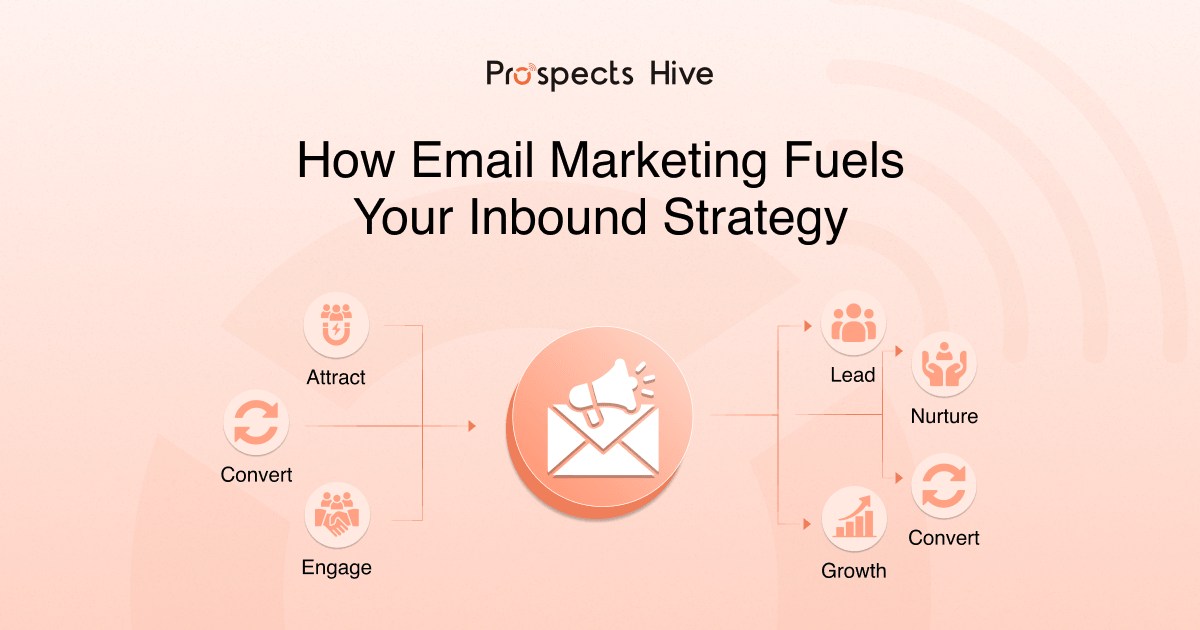
So, how can email marketing fuel your overall inbound strategy? Email helps you turn inbound traffic into known contacts, keep interested prospects engaged, and use CRM context to guide relevant follow-up. It can move someone from useful content toward a qualified sales conversation when their fit and engagement justify direct outreach.
Email works best when you connect it with the rest of your inbound system. SEO and content attract attention, lead capture identifies the contact, your CRM stores useful context, and email keeps the relationship active. This guide explains how that process works and how you can connect email engagement with qualified pipeline.
What Role Does Email Marketing Play in an Inbound Strategy?
Email gives you a direct way to continue the relationship after someone discovers your business. Search, content, LinkedIn, referrals, or webinars may create the first interaction, but prospects will not always return on their own.
Once someone chooses to subscribe, register, or request a resource, you can follow up where appropriate and permitted. You also gain first-party information that helps you understand what brought them in and which topics they continue to engage with.
This is why email plays such an important role in inbound marketing. Inbound earns attention. Email gives you a way to move that attention toward another relevant resource, further qualification, or a sales conversation.
Inbound Email Marketing vs Outbound Email Marketing
Inbound email continues a relationship that already exists, while outbound email starts a conversation with a selected prospect. You can use both for B2B growth, but the starting point changes how you approach the message.
| Area | Inbound Email | Outbound Email |
|---|---|---|
| Audience | Existing contacts and leads | Selected prospects |
| Starting point | Previous interaction or opt-in | ICP, research, or relevant signals |
| Typical trigger | Download, signup, webinar, form | Company fit, role, timing signal |
| Main data source | CRM and inbound behavior | Prospect research and enrichment |
| Primary goal | Develop existing interest | Start a relevant conversation |
| Common content | Guides, case studies, nurture emails | Personalized prospecting messages |
If someone downloads your CRM guide, they already understand part of the context. A cold prospect may need you to establish that relevance before anything else.
That difference should shape both your message and your next step. Inbound email can build on what the prospect already knows, while outbound email first needs to create a reason for the conversation.
How Email Marketing Fuels Each Stage of Your Inbound Strategy
Email has a different job at each stage of the inbound journey. The message you send after a first resource download should serve a different purpose from an email sent after several visits to a service page.
Turn Anonymous Website Visitors into Known Leads
Lead capture gives anonymous website visitors a way to become identifiable contacts. You can use reports, webinars, guides, checklists, newsletters, or other useful resources to give visitors a reason to share their details.
That information can create or update a record in your CRM. From there, you can connect the original lead source with later activity such as downloads, registrations, replies, and service-page visits.
Over time, you build a clearer record of the topics, resources, and services each contact engages with. That context helps you decide which follow-up makes sense, and which contacts need more time.
Bring Prospects Back to Useful Inbound Content
Your best content does not have to depend on another Google search to be found again. Email can bring interested contacts back to relevant articles, reports, webinars, case studies, or service-related resources.
You can also repurpose longer content into shorter email insights. One useful finding from a larger guide might become a brief email that explains the idea and links to the full resource.
This helps you get more value from the content you have already created. The email should add context instead of simply telling subscribers that you published something new.
Nurture Leads That Are Not Ready for Sales Yet
Some inbound leads need time before they are ready for a sales conversation. They may understand the problem but still need evidence, internal agreement, or a clearer view of the available options.
Your nurture content should reflect that level of readiness. Someone still researching a problem may need practical educational content, while a prospect comparing solutions may find a case study or service explanation more useful.
Lifecycle stage can help you structure that process, but it should not be your only input. Topic interest, company context, and previous engagement can make your follow-up much more relevant.
Trigger Follow-Up from Real Prospect Behavior
Behavior-based email allows your next message to respond to something the prospect actually did. That is usually more useful than sending every contact through the same fixed sequence.
You might change the follow-up when someone downloads a guide, registers for a webinar, clicks a case study, or returns to a service page. Each action gives you more context about what that person is exploring now.
Timing still matters in automation. A stronger setup combines timing with behavior, so your sequence can adjust when the prospect’s activity shows a change in interest.
Re-Engage Leads That Have Gone Quiet
A lead that stops engaging may still become relevant again later. If you have an updated report, new case study, webinar, or useful resource, email gives you another chance to reconnect.
Re-engagement also helps you identify when continued nurture no longer makes sense. Repeated inactivity, an unsubscribe, a hard bounce, or a sales disqualification should change what your workflow does next.
A good system knows when to reduce contact as well as when to send another message. That keeps your list healthier and prevents unnecessary follow-up.
Keep Providing Value After Conversion
Your inbound email strategy can continue after a prospect becomes a customer. Onboarding information and educational resources can help customers understand what happens next and get more value from the relationship.
Later communication can include implementation guidance, service updates, or educational content related to the work they already use. This can support retention, expansion, referrals, and customer advocacy when the information remains useful.
The goal is to stay relevant after the sale. You do not need to turn every customer email into another promotion.
How Email and CRM Create a Closed-Loop Inbound System
Email becomes much more useful when your CRM shapes the message, and email activity sends new context back into the CRM. This creates a loop where every relevant interaction can improve your next marketing or sales decision.
A simple version looks like this:
Attract → Identify → Learn → Nurture → Detect Intent → Route → Learn Again
The system works better when each interaction gives your team more information for the next step. That might mean continuing nurture, changing the content, updating a lead score, or assigning a sales follow-up task.
What CRM Data Tells Your Email Strategy
Your CRM helps you decide which contacts should receive a message and what that message should address. Useful information can include lead source, company, lifecycle stage, previous activity, topic interest, and current sales status.
A contact who downloaded a CRM automation guide should not automatically receive the same follow-up as someone who joined a general newsletter. The context you already have, gives you a better starting point.
Customer status also matters. Once someone converts, your workflow should recognize that change and adjust future communication accordingly.
What Email Engagement Sends Back to the CRM
Email activity adds new context to the contact record. Clicks, replies, registrations, downloads, conversions, or prolonged inactivity can show how the relationship is developing.
That data needs a clear purpose. A reply may justify direct follow-up, repeated interest in one topic may change segmentation, and continued inactivity may move the contact into another nurture path.
Email engagement gives your marketing and sales teams more evidence about what a prospect cares about. It also helps you decide what kind of follow-up is appropriate next.
Which Email Behaviors Signal Stronger Interest?
Email engagement can help you spot growing intent when you evaluate it alongside prospect fit and wider activity. One open or one click is rarely enough to decide that someone is ready for sales.
More meaningful signals may include:
- Replying to an email
- Clicking several resources about the same problem
- Viewing a case study
- Registering for a webinar
- Returning to a relevant service page
- Downloading another resource
- Revisiting high-intent content within a short period
Several related actions usually tell you more than one isolated event. If a prospect downloads your CRM guide, clicks an automation case study, and later returns to your CRM service page; you have a clearer pattern of interest.
Fit still matters. Engagement carries more weight when the company, role, and use case also match your ICP.
How Lead Scoring and Sales Handoff Turn Engagement into Pipeline
Email engagement becomes more useful when you know when marketing should continue nurturing and when sales should step in. That decision should combine prospect fit with meaningful behavior.
A simple workflow can look like this:
Engagement → Qualification → CRM Update → Sales Handoff → Follow-Up
You might give more weight to a reply or service-page visit than to a general blog click. Company fit, seniority, use case, and account relevance can also influence qualification.
Once a contact meets your agreed fit and engagement threshold, the CRM can update the lifecycle stage or create a task for the relevant sales rep. Your existing nurture should then pause or change if direct sales contact begins.
Clear handoff rules keep promising inbound leads from sitting inside automation for too long. They also reduce the risk of marketing sending messages that conflict with an active sales conversation.
How Email Helps Different Stakeholders Move Toward a Decision
B2B decisions often involve several people, so one contact’s email journey may show only part of the account’s interest. Different stakeholders can care about different questions before the company moves forward.
| Stakeholder | Content That May Help |
|---|---|
| Marketing Lead | Strategy, process, campaign examples |
| Sales Leader | Qualification, pipeline, sales impact |
| RevOps | CRM workflows, integrations, data |
| Leadership | Business case and measurable outcomes |
| Operations | Process and implementation details |
You do not need a separate nurture campaign for every job title. One piece of content, however, may not answer every question across the account.
Account-level CRM data can help you see when several contacts from the same company engage with related resources. That gives your sales team more context about how interest is developing across the account.
How Email Engagement Can Improve Your Content Strategy
Clicks and replies can show you which questions your prospects care about most. Email therefore has value beyond distributing content you have already created.
The feedback loop can look like this:
Content → Email → Engagement → Topic Insight → Better Content
Suppose your prospects consistently engage with CRM cleanup content but rarely click broader automation topics. That pattern can show you which problems they are actively researching or asking for help with.
Replies can reveal even more. Contacts may ask specific questions, raise objections, describe their challenges in their own words, or point out information they still need.
You can use those insights to shape future articles, case studies, service pages, sales enablement material, and nurture emails. Your email program starts feeding real prospect questions back into your content strategy.
A Practical B2B Example of Email Fueling an Inbound Journey
The easiest way to understand how email marketing can fuel your overall inbound strategy is to follow one prospect through the system. Imagine someone searches Google for information about improving CRM workflows and finds your article.
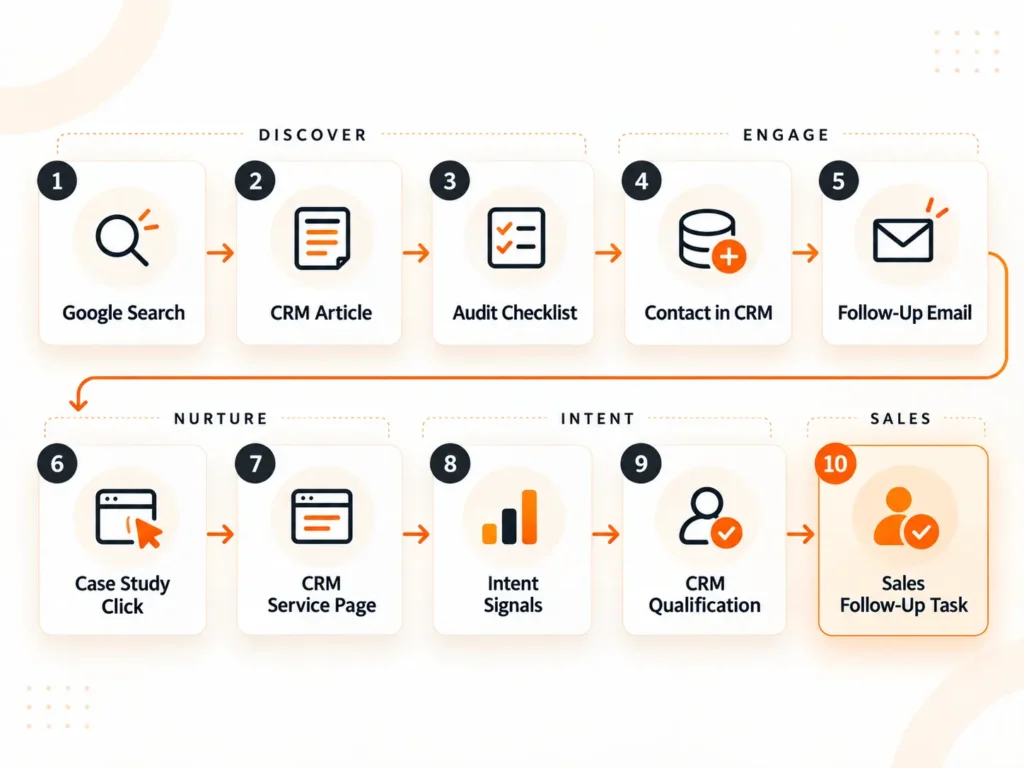
This example shows what can happen next. After downloading a CRM audit checklist, the prospect enters your CRM and receives relevant educational follow-up. If they click a CRM automation case study and return to your service page, those actions create stronger intent signals.
Your CRM can use that activity alongside prospect fit to update the lead score or lifecycle stage and trigger a follow-up task for sales. Email helps move the prospect from initial discovery to continued nurture, stronger buying signals, and a timely sales conversation.
The opportunity does not come from one email alone. It develops through several connected interactions that give you a clearer view of the prospect’s interest and readiness.
How to Measure Email’s Impact on Your Inbound Strategy
Your email metrics should show whether the right contacts are progressing toward qualified leads, meetings, opportunities, pipeline, or customer retention. Opens and clicks provide context, but they do not prove that nurture is creating business impact.
Start with email health because poor delivery affects every metric that comes after it. Then look at whether engagement leads to movement through your GTM process.
Email Health and Engagement
Useful measures include deliverability, bounce rate, unsubscribe rate, clicks, and replies. These metrics help you see whether contacts receive your emails and whether the content creates useful engagement.
Context matters when you interpret them. A high click rate is less valuable if the contacts sit outside your ICP or never progress beyond educational content.
Lead Progression and Sales Impact
Next, look at whether your email activity helps contacts move from nurture into qualification, meetings, and opportunities. Useful measures include qualified leads, lifecycle-stage changes, meetings booked, opportunities created, and successful sales handoffs.
Email-influenced pipeline can also give you useful context when attribution is handled carefully. Avoid claiming that one email caused an opportunity when several marketing and sales interactions contributed to the outcome.
Customer Outcomes
Post-conversion email can influence retention, expansion, and referrals. These outcomes matter when your emails continue helping customers after the initial sale.
Measure each email against the job it was meant to do. Your customer onboarding email and lead-nurture sequence should not share the same success criteria.
What Email Marketing Cannot Fix in Your Inbound Strategy
Email can strengthen your inbound strategy, but it cannot repair weak fundamentals. Better automation will not make poor traffic or low-value content more useful.
Common problems include:
- Traffic that does not match your ICP
- Weak positioning
- Low-value lead magnets
- Content that misses real prospect questions
- Inaccurate CRM data
- Poor segmentation
- Deliverability problems
- Weak qualification rules
- Slow sales follow-up
These issues often appear later as an email problem because that is where the weakness becomes visible. The real cause may sit much earlier in your funnel or inside your CRM process.
Fixing the surrounding system can create more value than adding another nurture sequence. If you are not sure where your CRM is falling short, start with the CRM optimization key metrics that can reveal problems with data quality, adoption, conversion, and pipeline performance.
How Prospects Hive Connects Email with Your Wider GTM System
At Prospects Hive, we connect email campaigns with prospect data, CRM activity, lead scoring, and sales follow-up workflows. We look at how prospects enter the CRM, which signals matter, and when nurture should turn into direct sales follow-up.
We can connect ICP research, enrichment, CRM automation, email sequences, LinkedIn outreach, qualification, and reporting where they support the same GTM process. For example, enrichment can improve segmentation, email engagement can update lead scores, and qualified activity can trigger a sales follow-up task.
We use engagement data to help determine which prospects need more nurture and which are ready for direct sales follow-up. Our CRM workflows help keep marketing and sales working from the same activity history and qualification context.
That structure matters because engagement alone does not create pipeline. We build the process around it so relevant activity can move into qualification, follow-up, and sales opportunities.
The Bottom Line
So, how can email marketing fuel your overall inbound strategy? It keeps useful conversations going after SEO, and content creates the first interaction. Your CRM context, nurture emails, and behavioral signals help you decide whether a prospect needs more information or is ready for sales follow-up.
Email works best when you connect it with the wider GTM system. That gives you a clearer path from inbound interest to qualification, sales conversations, and pipeline.
Frequently Asked Questions
How Can Email Marketing Fuel Your Overall Inbound Strategy?
Email marketing fuels your inbound strategy by turning website visitors into known contacts, nurturing their interest, and using engagement data to guide the next step. When you connect email with your CRM, you can track engagement, identify stronger intent, qualify leads, and move relevant prospects into sales follow-up.
Can Inbound Email Marketing Work Without a CRM?
Yes, you can run inbound email without a CRM, but managing lead history and follow-up becomes harder. A CRM gives you one place to track where leads came from, what they engaged with, their lifecycle stage, and whether they are ready for sales.
How Often Should You Send Inbound Marketing Emails?
Send inbound marketing emails when you have something relevant to the prospect’s needs or stage. Adjust the cadence based on recent engagement, content interest, and where the contact sits in the journey instead of using one fixed schedule for everyone.
How Many Emails Should Be in a Lead Nurture Sequence?
There is no fixed number of emails every lead nurture sequence should contain. Build the sequence around the questions and information a prospect needs, then use their engagement to decide whether to continue nurturing, change the message, or move them to sales follow-up.
Should Inbound Email Marketing Be Automated?
Yes, automation works well for repeatable inbound emails such as welcome messages, content follow-ups, webinar reminders, and re-engagement. Use CRM data and prospect behavior so the workflow can change when a contact shows new interest or reaches a different stage.
When Should You Stop Nurturing a Lead by Email?
Stop or change email nurture when a contact unsubscribes, remains inactive, becomes disqualified, converts, or enters an active sales conversation. Your CRM should update the contact’s status and move them into the appropriate next workflow.
What Is the Difference Between an Inbound Email and a Newsletter?
A newsletter is one type of inbound email, usually sent to subscribers on a regular schedule. Inbound email also includes welcome emails, nurture sequences, event follow-ups, re-engagement emails, and behavior-triggered messages based on what a contact does.